

For Queensland pool builders
A pool builder app from first enquiry to final invoice
A pool build runs for weeks, with a deposit, progress payments, a crew and a customer who wants updates. Keep the enquiry, the itemised quote, every invoice and the job schedule in one place.
Pilot offer: the first 20 businesses to sign up get 3 months at no charge (no card needed), then 25% off for as long as you stay a member. 17 of 20 places left. How it works
 Pilot offer: the first 20 businesses to sign up get 3 months at no charge (no card needed), then 25% off for as long as you stay a member. 17 of 20 places left.
The demo is your own private copy with made-up example data. No sign-up, and it's deleted automatically.
Prices include GST.
The money rules on a pool contract
Three QBCC rules shape how a Queensland pool builder quotes and bills. The app keeps the first one in front of you.
- Deposits are capped. QBCC sets 20% for work of $3,300 or less, 10% from $3,301 to $19,999 and 5% for more than $20,000. On a $60,000 pool that is $3,000.
- A cooling-off period. QBCC says contracts for building work over $3,300 must include advice about the customer's right to cool off, generally five business days.
- Home warranty insurance. QBCC says it is compulsory for residential construction work valued at more than $3,300, with the premium included in the contract and paid before work begins.
Sources: QBCC, Deposits and progress payments and Cooling-off period (both reviewed 27 Jun 2025), What is home warranty insurance (reviewed 11 May 2025); all read 5 Nov 2026.
PoolPreCert does not write contracts or arrange insurance. What it does is check every deposit invoice against the first rule, counting deposits already taken, and warn you before you go over.
One build, from enquiry to final invoice
How the pool building app carries one job, in real phone screens from the pool builder demo with example data. Builders get the quote builder without the fence questions: items and labour from your own list.
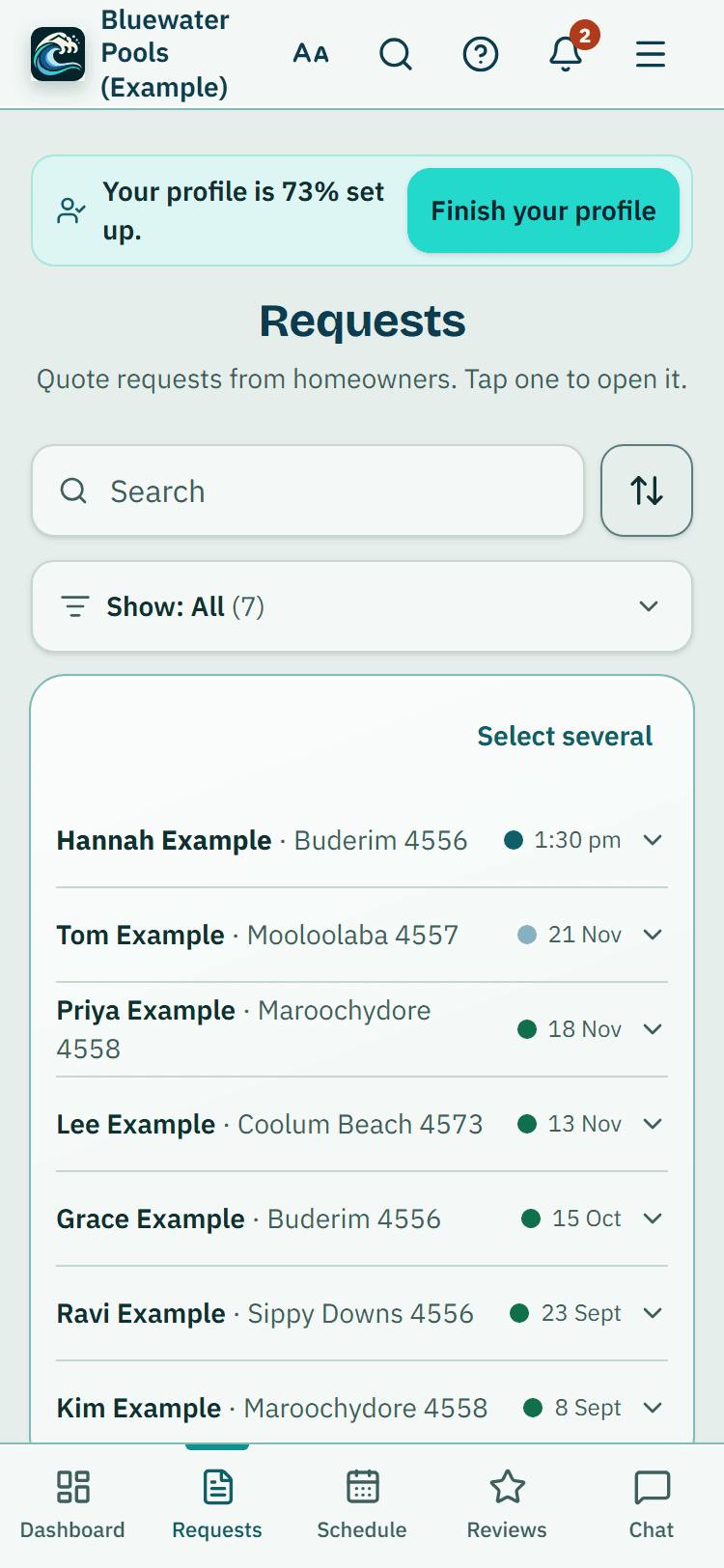
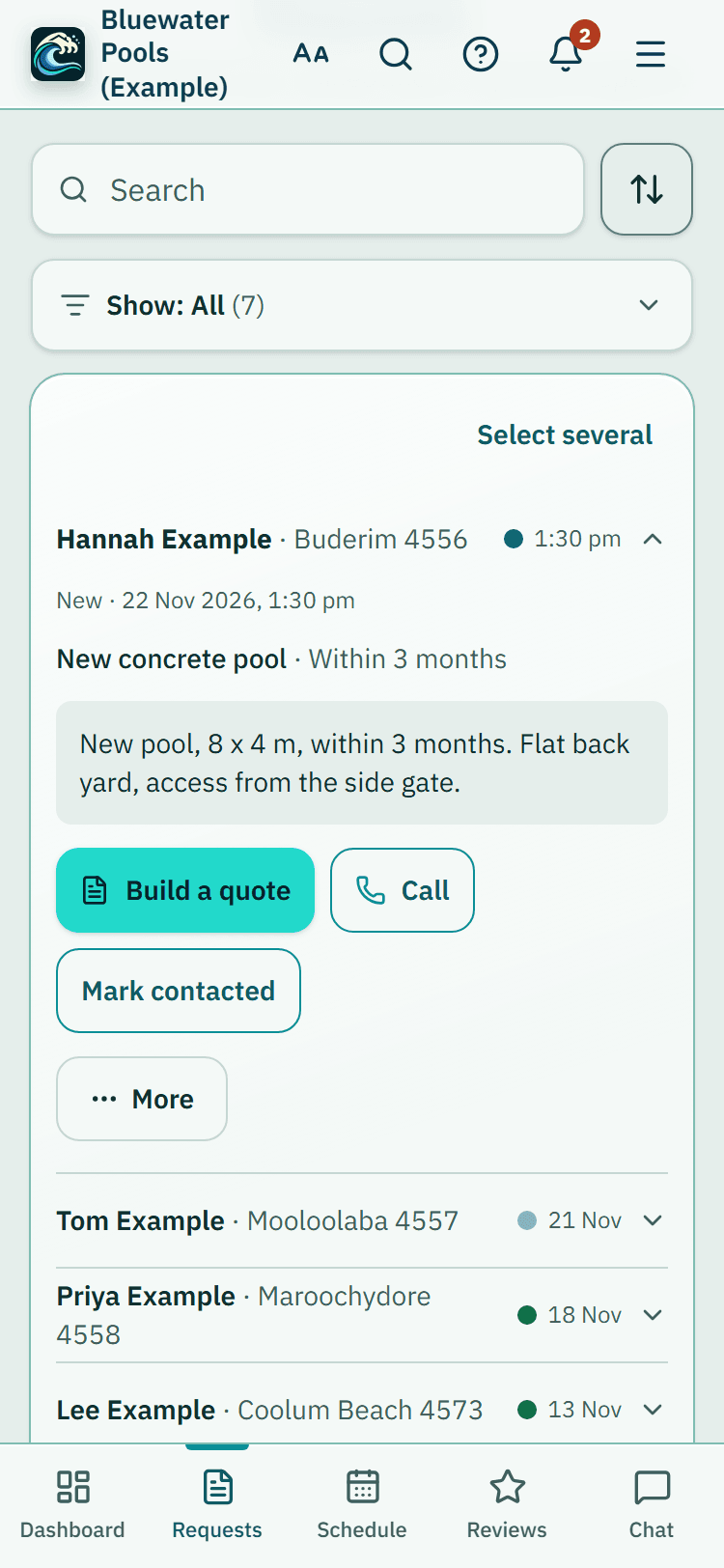
The enquiry
Each request says the type of work (new pool, renovation, upgrade, or your own types of work set in Settings), with the homeowner's description, suburb, rough timing and contact details, and sometimes an AI picture of the pool they have in mind, labelled as theirs. It goes only to you.
Quote, deposit, progress payments, the rest
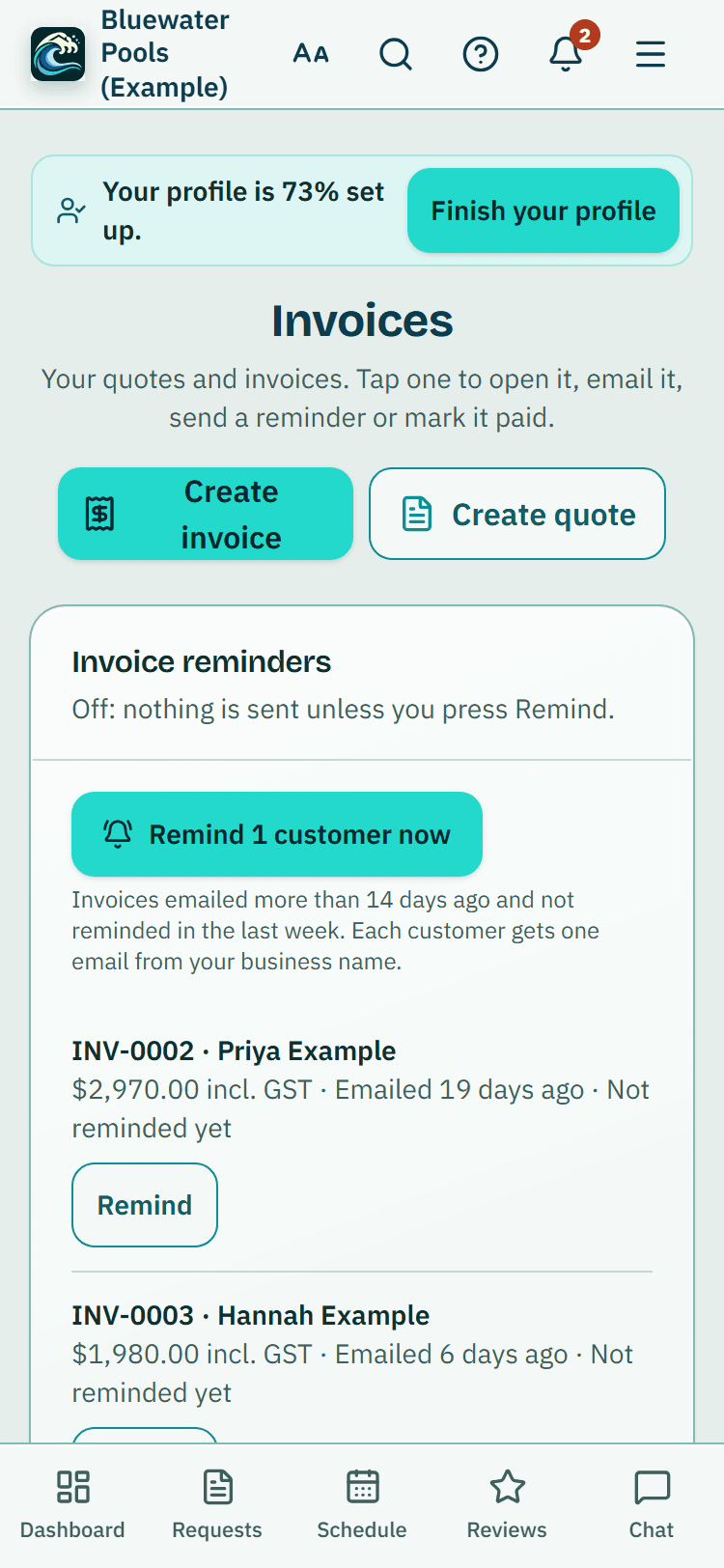
Build the quote from your items and labour. Once it is accepted, invoice a deposit, then progress payments as a percentage or an amount. Each invoice is linked to the quote, and Invoice the rest takes off everything already billed.
- The Invoices page totals what is awaiting payment, paid and still quoted
The crew and the schedule
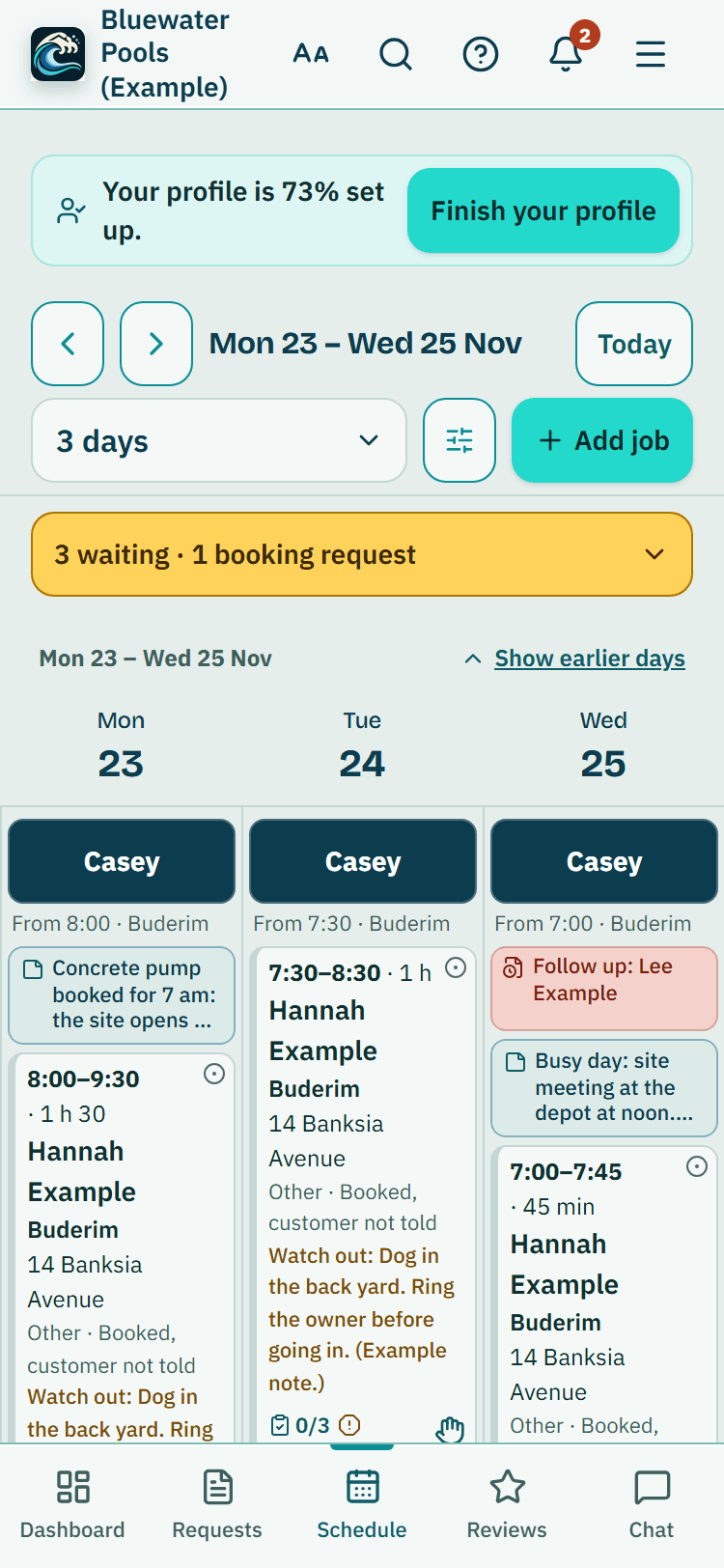
Each job carries a status colour and what it is waiting on: the customer, parts, quote approval, access, payment or on hold. Up to 4 people on a job, with clashes flagged and each person able to see just their own jobs.
Site visits customers can ask for
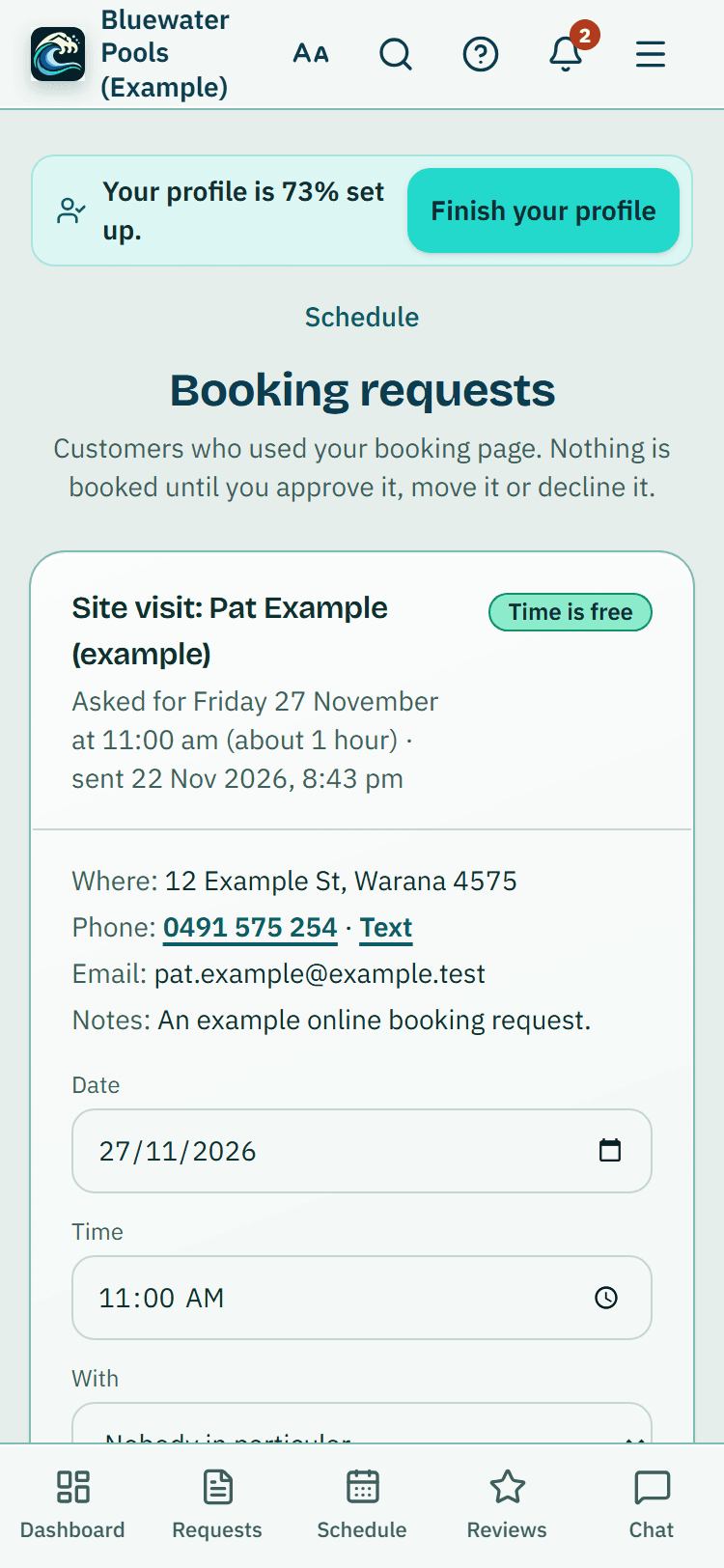
Your booking page offers open times for a measure-up or a site visit, built from your hours and jobs already booked. Nothing is booked until you approve it, unless you switch on automatic booking.
On site, week after week
The parts of a long job that usually live in a notebook and a camera roll.
Text a customer to confirm a site visit, remind them the day before or say you are on your way. Off until you switch it on, and every text gives your phone number to call.
A roster with time off requests for your crew, clock on and off from a phone with weekly timesheets you approve, and team chat for the day.
Job templates with a tick-list
Save a type of job with its length and tick-list, such as a pre-pour check of your own, and start a new job from it in one tap. A tick-list is your prompt, not an inspection record.
A gate code, a dog, where to park the bobcat: a site note shows on every later job at that address before anyone arrives.
Progress photos
Photos on each job, marked with circles, arrows or text, with before and after pairs side by side and a site photo pinned to the property.
Costs and profit
Enter labour hours, materials and other costs, and the job shows what it earned against the invoice. For your own use, not accounting advice.
Send a link to a page with their bookings, quotes and invoices and where each one is up to. No sign-in, it expires, and you can switch it off.
One tap beside each phone number and address. Text opens your own messaging app, and Directions opens your phone's maps app.
What it does, and what it doesn't
What it does
- Brings you new pool, renovation and upgrade enquiries from homeowners who chose you
- Prices itemised quotes and makes deposit, progress and final invoices linked to them
- Checks each deposit invoice against QBCC's limit for the job's size
- Keeps crews, statuses, site notes, photos and job costs together
What it does not do
- Store plans, drawings or the building contract
- Book the certifier, lodge anything or arrange home warranty insurance
- Take card payments or let the customer sign a quote online
- Show your jobs on a map or track where your crew is
- Say a pool or its fence meets the standard: the certifier and a licensed inspector decide
QBCC says the certifier inspects and certifies the pool fence before the pool is filled to 300 mm or more. Our guides walk through building a pool in order and the pool safety paperwork at handover.
Source: QBCC, Build a pool (page reviewed 30 Aug 2021, published 27 Jun 2022; read 6 Nov 2026).
What the builder app costs
Your listing: no charge. Project requests: no charge until at least 17 October 2027.
Quotes, invoices, the schedule and the job tools: Starter $49 or Business $99 a month, incl. GST.
Pilot offer: the first 20 businesses to sign up get 3 months at no charge (no card needed), then 25% off for as long as you stay a member. The months at no charge count from the day you sign up. 17 of 20 places left. After the places are gone, both plans start with a 14-day trial, no card required.
No commissions and no per-job fees.
Start 3 months at no chargeFind your listingCompare the plans
The same app, set up for other trades: Pool inspector app: the licensed inspector's day, from booking to the To lodge list. Pool fencing app: repair requests, quotes from your own price list and deposit invoices.
Common questions
Does it handle progress payments?
Yes, as invoices. On an accepted quote, open Invoice a deposit or progress payment, choose Deposit or Progress payment, then a percentage or an amount. Each one is linked to the quote, and the last invoice takes off what was already billed. It does not keep a contract's stage schedule for you.
Can I keep plans, drawings or the building contract in it?
There is no store for plans, drawings or contracts. Photos go on each job, with circles, arrows and before and after pairs, and a file of up to 10 MB in all can travel with a quote or invoice email.
Does it deal with the certifier or home warranty insurance?
No. It does not book a certifier, lodge anything or arrange home warranty insurance. It keeps your enquiries, customers, quotes, invoices and jobs. QBCC's pages on building a pool and on home warranty insurance set out those steps.
Can my crew see their own jobs on a phone?
Yes. Invite them on the Team page with a role, put up to 4 people on a job, and each person can switch the schedule between everyone's jobs and their own. Site notes such as a gate code show before anyone arrives.
What does the builder app cost?
Claiming your listing has no charge, and project requests have no charge until at least 17 October 2027. The quotes, invoices, schedule and job tools are part of a business membership: Starter $49 or Business $99 a month, incl. GST. The first 20 businesses to sign up get 3 months at no charge (no card needed), then 25% off for as long as you stay a member. After the places are gone, plans start with a 14-day trial, no card required.
Run your next build in it
Open the pool builder demo with made-up enquiries and jobs, or start your own with one real quote.
Related help articles
Sources
- QBCC: Deposits and progress payments (page reviewed 27 Jun 2025; read 5 Nov 2026) (opens in a new tab)
- QBCC: Cooling-off period (page reviewed 27 Jun 2025; read 5 Nov 2026) (opens in a new tab)
- QBCC: What is home warranty insurance (page reviewed 11 May 2025; read 5 Nov 2026) (opens in a new tab)
- QBCC: Build a pool (page reviewed 30 Aug 2021, published 27 Jun 2022; read 6 Nov 2026) (opens in a new tab)
Last checked against QBCC guidance: 19 November 2026.