

For pool safety inspectors, fence contractors, pool builders and property managers
Customer database for pool businesses: every customer, property and job in one place
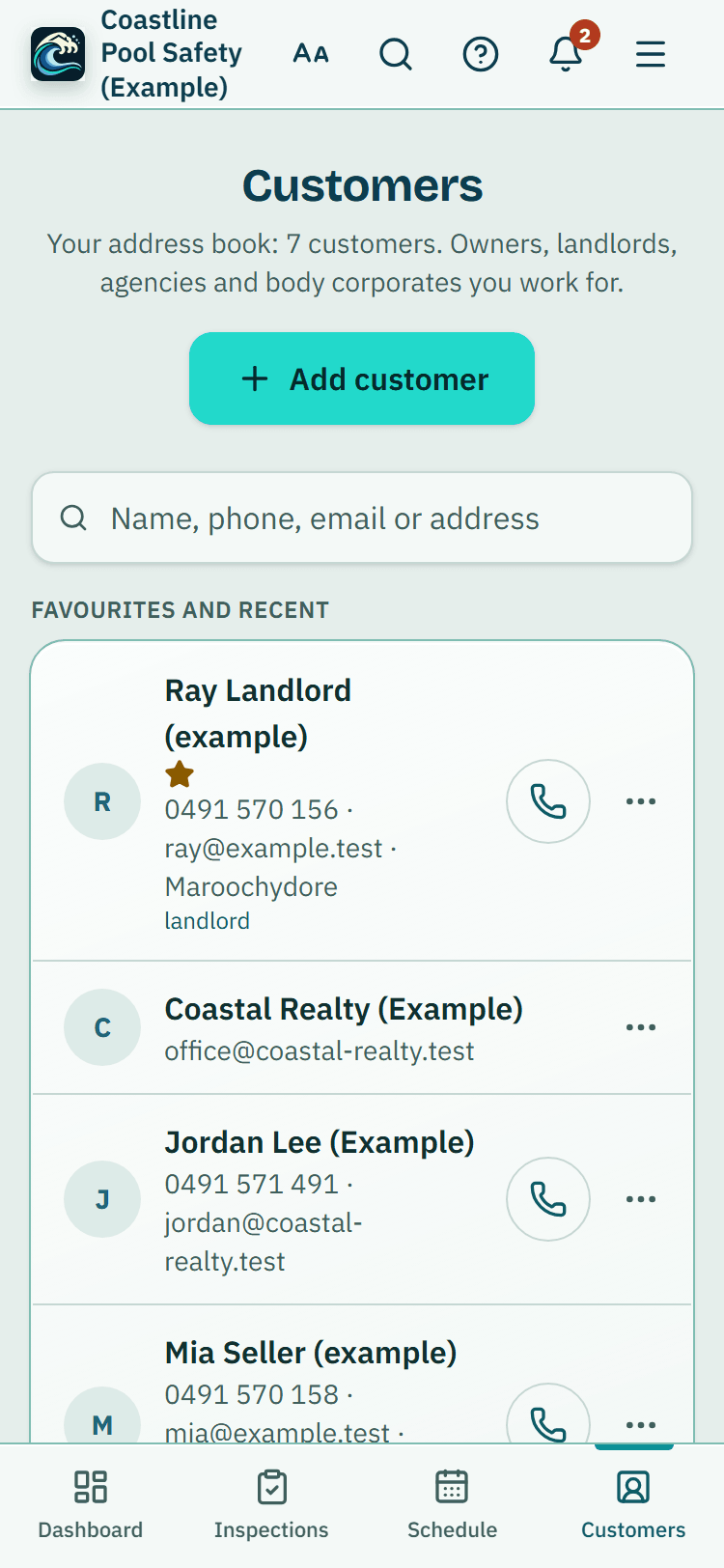
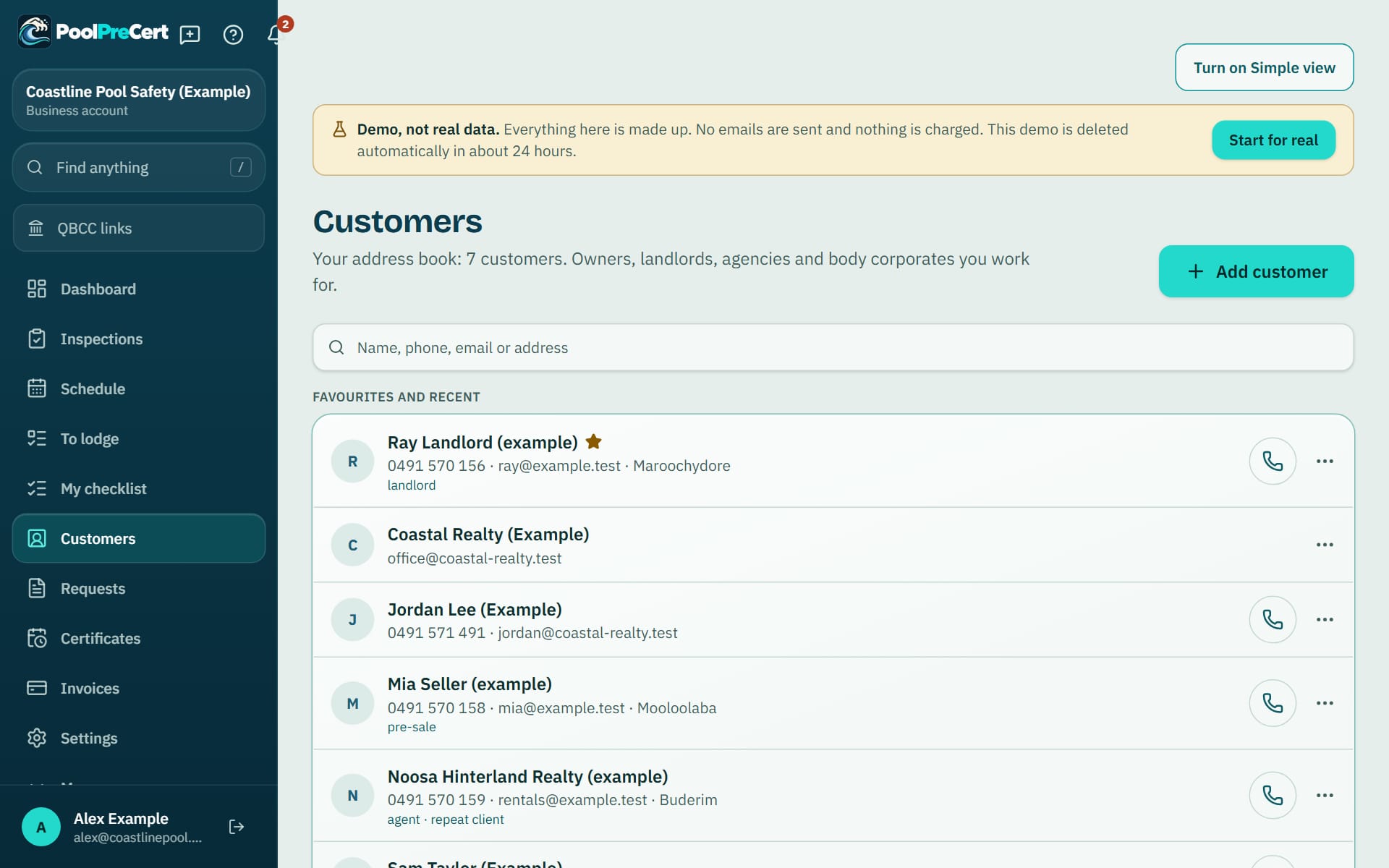
Customers is a customer database for pool businesses, set out as a plain address book for the owners, landlords and agencies you work for.
Read more
Open one person and their contact details come first, with one-tap Call, Text, Email and Directions, then their properties, jobs, notes, quotes and invoices on one page. Agencies and property managers see the same tool under the name Owners and contacts.
Pilot offer: the first 20 businesses to sign up get 3 months at no charge (no card needed), then 25% off for as long as you stay a member. 17 of 20 places left. How it works
 Pilot offer: the first 20 businesses to sign up get 3 months at no charge (no card needed), then 25% off for as long as you stay a member. 17 of 20 places left.
The demo is your own private copy with made-up example data. No sign-up, and it's deleted automatically.
Prices include GST.
What you get with Customers
Add customers fast, with tags and favourites
Press Add customer (Add owner or contact for an agency): one form asks whether they are a real estate agency, then their name, email and mobile, with more emails, billing details and addresses if you have them. Then add their property from their page.
Read more
You can also make a customer while writing a quote or an invoice without leaving the page.
Tags group people, and Add to favourites pins the ones you use most. Search finds anyone by name, email, phone, suburb or property address, and customers you opened lately come first.
Customer notes, properties and a timeline
Customer notes live under Notes. Press Add note for a call, access instructions or what you quoted. Each note is dated and signed by the person who wrote it, newest first. A note can be deleted by anyone who can edit customers.
Read more
The Activity card lists the requests the customer came from, inspections, quotes, invoices and reports, newest first. Customer pages also show the properties, the jobs in your Schedule and the inspection history, with a Start button on each property. Book a job, Add property, Create quote and Create invoice are under More (a fence contractor or pool builder sees Create quote at the top).
Several emails, billing details and real estate agencies
A contact can have several emails and mobiles, each ticked for invoices, reports or reminders, and search finds them by any of them. Email it starts with the addresses ticked, each on its own email. The form asks first: Is this a real estate agency?
Read more
An agency's page lists its property managers. Billing details (ABN, billing address, PO number, payment terms) go on the invoices you make for them.
The customer link
The Customer link card makes one private link for one customer. They see their upcoming and recent bookings, quotes, invoices and the certificate dates you have recorded, without signing in. Choose 7, 30 or 90 days, press Make a link, copy it or press Email it from your own mail.
Read more
Drafts, cancelled documents, your internal notes and other customers are never in it, and search engines do not list the page. You can see how many times it has been opened, and Switch off ends it early. Anyone holding the link can see the page until then, so send it only to that customer.
Import customers from Excel or your phone, and export them
To import customers from Excel or your phone, use Import from a CSV file. It takes a CSV spreadsheet, an Excel .xlsx file or a .vcf contacts file from your phone. You can also paste cells.
Read more
PoolPreCert finds the columns, shows one preview where each person is marked Add, Update, Skip or Needs a fix, and saves nothing until you press Import. A file can be up to 5 MB and 5,000 people.
People are matched on phone or email, so importing twice does not double anyone up, and only empty fields are filled in for people you already have. Press Undo this import within 10 minutes if you change your mind. Export as CSV saves your whole address book as a spreadsheet.
Merge duplicate customers, archiving and who can do what
To merge duplicate customers, start with the notice that appears when two people share an email or phone number. Find duplicates lists the pairs.
Read more
Press Keep this one, merge and confirm, and the other person's jobs, properties, inspections, quotes, invoices, notes, extra emails, mobiles and addresses move across, and the other record is archived. Merged the wrong pair? Undo the merge puts both back for 15 minutes afterwards.
Owners and admins can press Archive customer. It asks first, then offers Undo, and archived customers stay under Archived customers at the bottom of the list, each with Put back. Viewers can look but not change anything, and anyone whose Deleting and archiving switch is off cannot archive or merge. Anyone whose Downloading switch is off cannot export. Change history, which restores an earlier version for 90 days, is on properties, pools, certificate records and tasks rather than on customers.






How to start
Open Customers
Choose Customers in the menu (Owners and contacts for an agency).
Add a person
Press Add customer, enter a name and phone number, and save.
Or import a list
Press Import from a CSV file, drop your file in, check the preview and press Import.
Add a note, a property or a job
Open the customer and use Add note, Add another property or Book a job.
Share a private link
On the Customer link card, choose how long it lasts and press Make a link.
What Customers does and does not do
What it does
- Keeps an address book of the owners, landlords and agencies you work for
- Ties each customer to their properties, jobs and notes
- Imports a list from a file and exports it again
- Finds duplicate customers so you can merge them
What it does not do
- Customers are your own records. They are never shown on your directory listing.
- It does not link to another product's account. You import from a file, pasted cells or a contacts file.
- A merge can only be undone for 15 minutes, and an import for 10 minutes.
- Nothing a customer does on their private page changes your records. They call or email you to change a booking.

Features that go with it
Schedule
Your jobs by day, week or month, with drag and drop, repeat visits, clash warnings, best order for the day and a private calendar link.
Booking page
Give customers a link to a page of open times built from your hours. Every booking arrives as a request you approve, move or decline.
Quotes and invoices
Make a quote or invoice from a job, property or customer, in PoolPreCert with no accounting software or in your own Xero. Optional follow-up emails chase quiet quotes.
Team and permissions
Invite staff by email, pick owner, administrator, inspector or viewer, and switch off prices, downloads or deleting for one person.


Guides that give the background
Step by step instructions: Help centre. All features are listed on the features page.
Common questions
Can I import customers from Excel or my phone?
Yes. Save a list from your old system as a CSV or Excel file, or share your phone contacts as a .vcf file, then use Import from a CSV file. The preview shows what will be added, updated or skipped before anything is saved.
Can I merge duplicate customers?
Yes. Find duplicates lists people who share an email or phone number. Keep this one, merge asks first, then moves the other person's jobs, properties, inspections, quotes, invoices and notes across and archives the other record. Undo the merge works for 15 minutes.
Can I export everything if I leave?
Yes. Export as CSV saves your whole address book as a spreadsheet, and an owner or admin can use Download my business data (spreadsheets, ZIP) under Reports and exports. An owner can switch off downloading for one person.
Do I need a full CRM as a sole trader?
Customers is an address book rather than a sales system. You start with a name and a phone number, then add email, company, address, tags, notes, jobs, quotes and invoices when you need them.
Can my customer see their own bookings?
Yes, through the customer link. It is one private page for that one customer with their bookings, quotes, invoices and certificate dates. You choose 7, 30 or 90 days and can switch it off early.
Does it cost extra?
No. It comes with the business plans. Starter is $49 a month and Business is $99 a month (incl. GST). The first 20 businesses to sign up get 3 months at no charge (no card needed), then 25% off for as long as you stay a member. After the places are gone, plans start with a 14-day trial, no card required.

What it needs and what it costs
The address book is part of the business plans and trials, for inspectors, contractors, builders and agencies alike. See the plans and prices. The first 20 businesses to sign up get 3 months at no charge, no card required. Prices include GST. Start 3 months at no charge
Try it before you pay
The first 20 businesses to sign up get 3 months at no charge, no card required. Prices include GST. The demo at the top of the page needs no sign-up.