

For Queensland pool fence contractors
A pool fencing app from the repair request to the paid invoice
A homeowner's self-check finds a gate that won't latch. The request reaches you with their notes and photos, you quote from your own prices, take a deposit, do the job and get paid, all in one app.
Pilot offer: the first 20 businesses to sign up get 3 months at no charge (no card needed), then 25% off for as long as you stay a member. 17 of 20 places left. How it works
 Pilot offer: the first 20 businesses to sign up get 3 months at no charge (no card needed), then 25% off for as long as you stay a member. 17 of 20 places left.
The demo is your own private copy with made-up example data. No sign-up, and it's deleted automatically.
Prices include GST.
Where the work starts
Most pool fence jobs begin with something small that a homeowner noticed.
QBCC's pool fences page gives the numbers most repair calls are about: a barrier at least 1200 mm high, and no gap under it of more than 100 mm.
When a homeowner's own check marks a gate, latch or panel as needing attention, they can send that list, with their notes and photos, to a contractor they pick from the directory. It is their own observation, not an inspection result, and it comes to you only if they agree.
Source: QBCC, Pool fences (page reviewed 12 May 2025; read 13 Nov 2026).
QBCC has no licence class just for pool fencing: its swimming pool construction, installation and maintenance class covers it, and fences are also built under structural landscaping licences. Our directory lists licence holders whose QBCC class is fences, or whose business name says they do fencing, and the licence is checked on QBCC's search when a listing is claimed.
Sources: QBCC licence class pages for swimming pool construction, installation and maintenance and for structural landscaping (both reviewed 31 Aug 2021; read 6 Nov 2026).
From request to paid, on one screen at a time
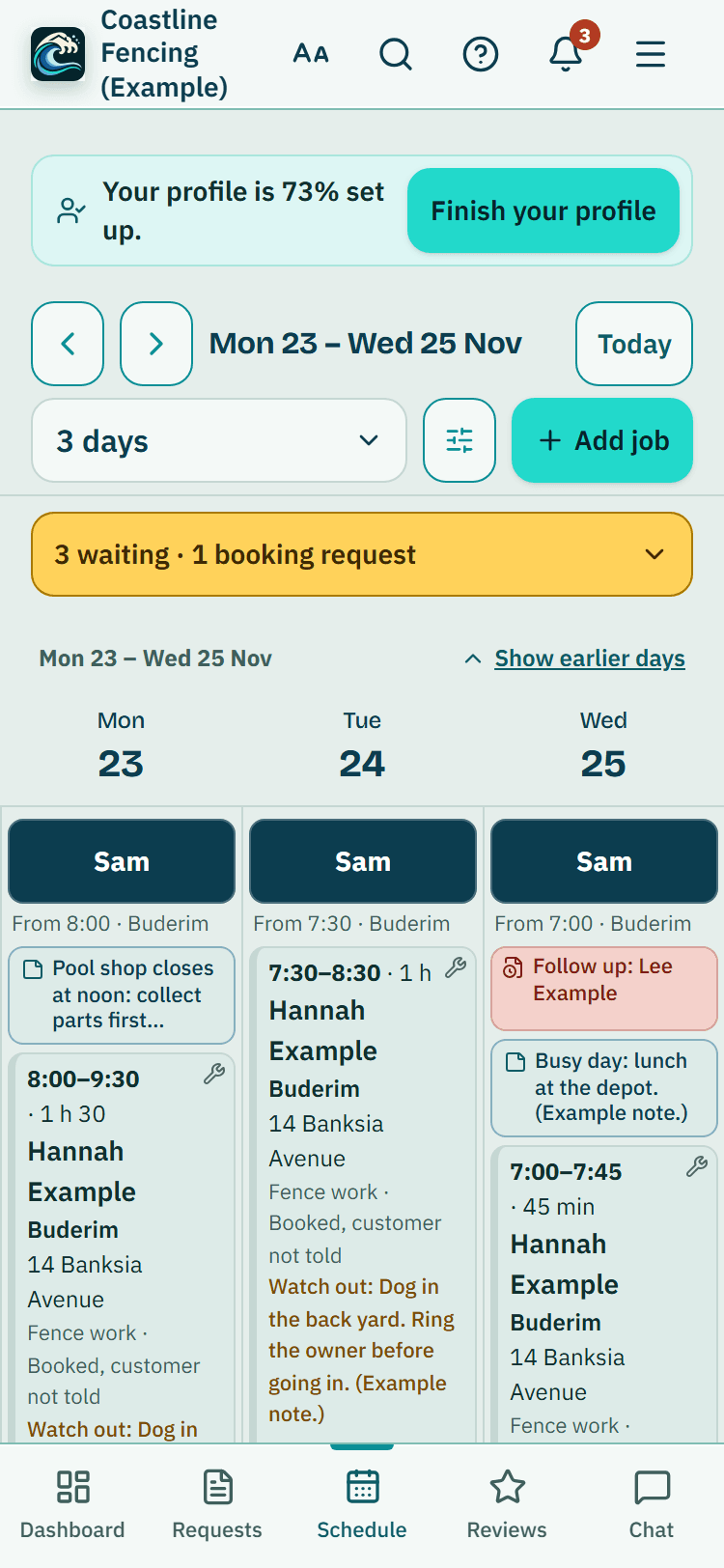
Real phone screens from the fence contractor demo, with example data.
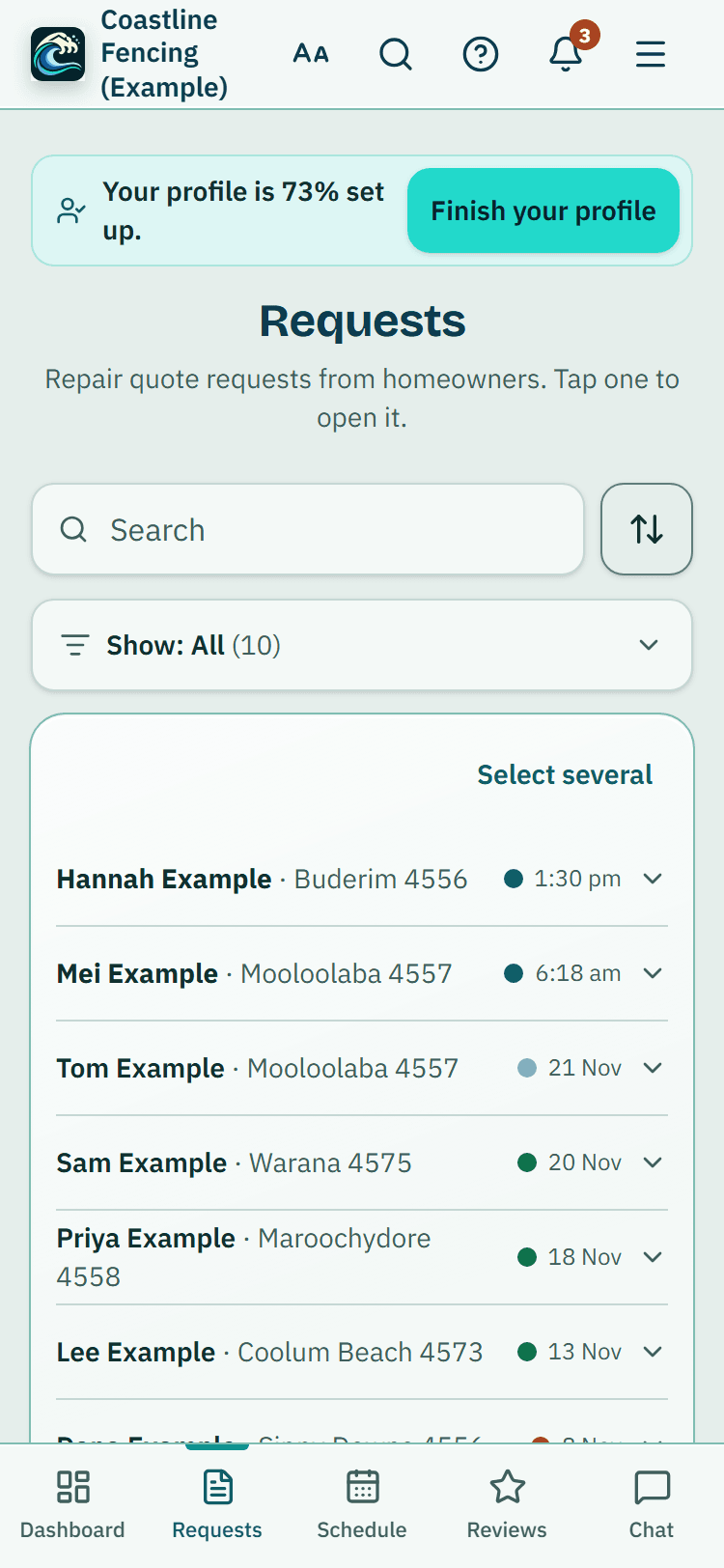
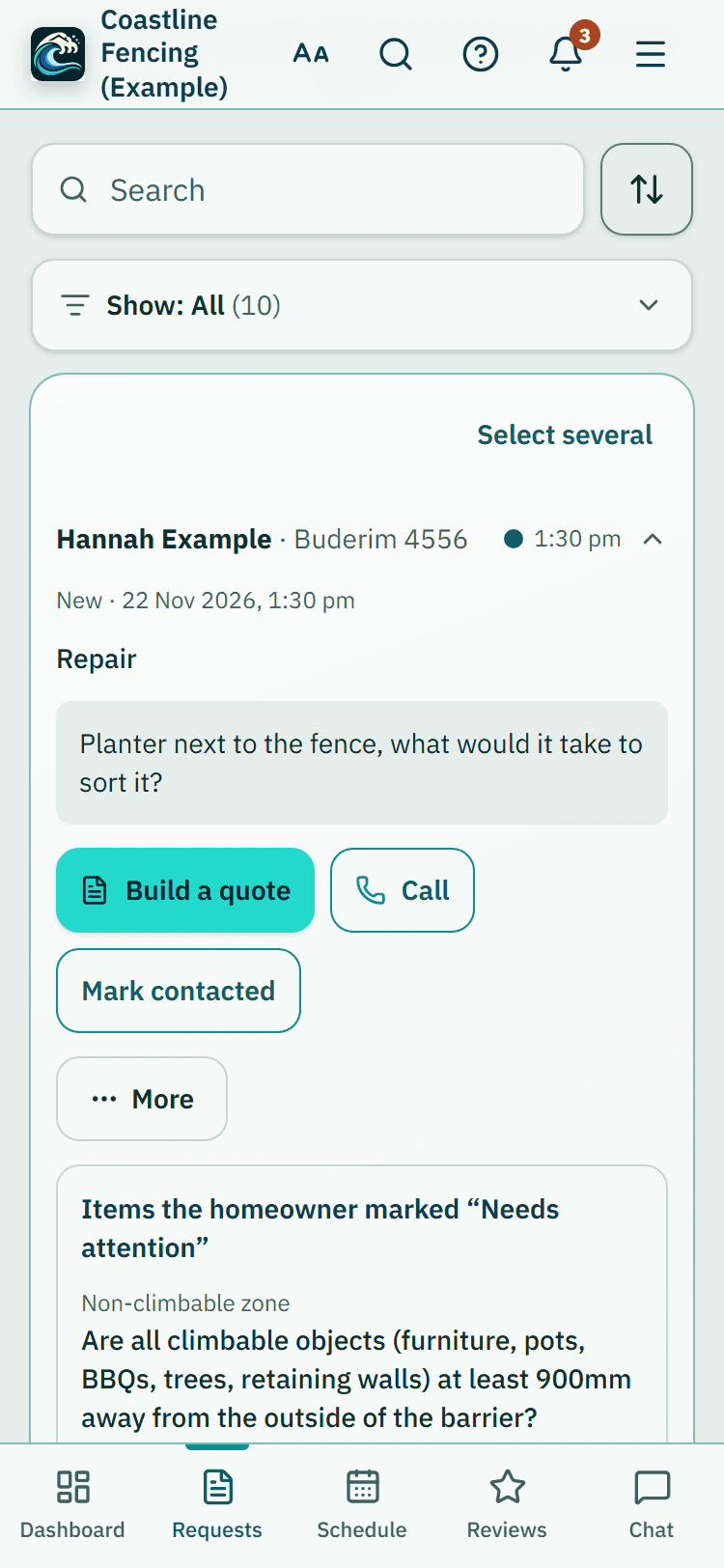
1. The request, with the problem already described
Name, phone, suburb, message and, when the homeowner agrees, the barrier items they marked with their notes and photos. Mark it contacted, quoted, booked or declined as it moves along.
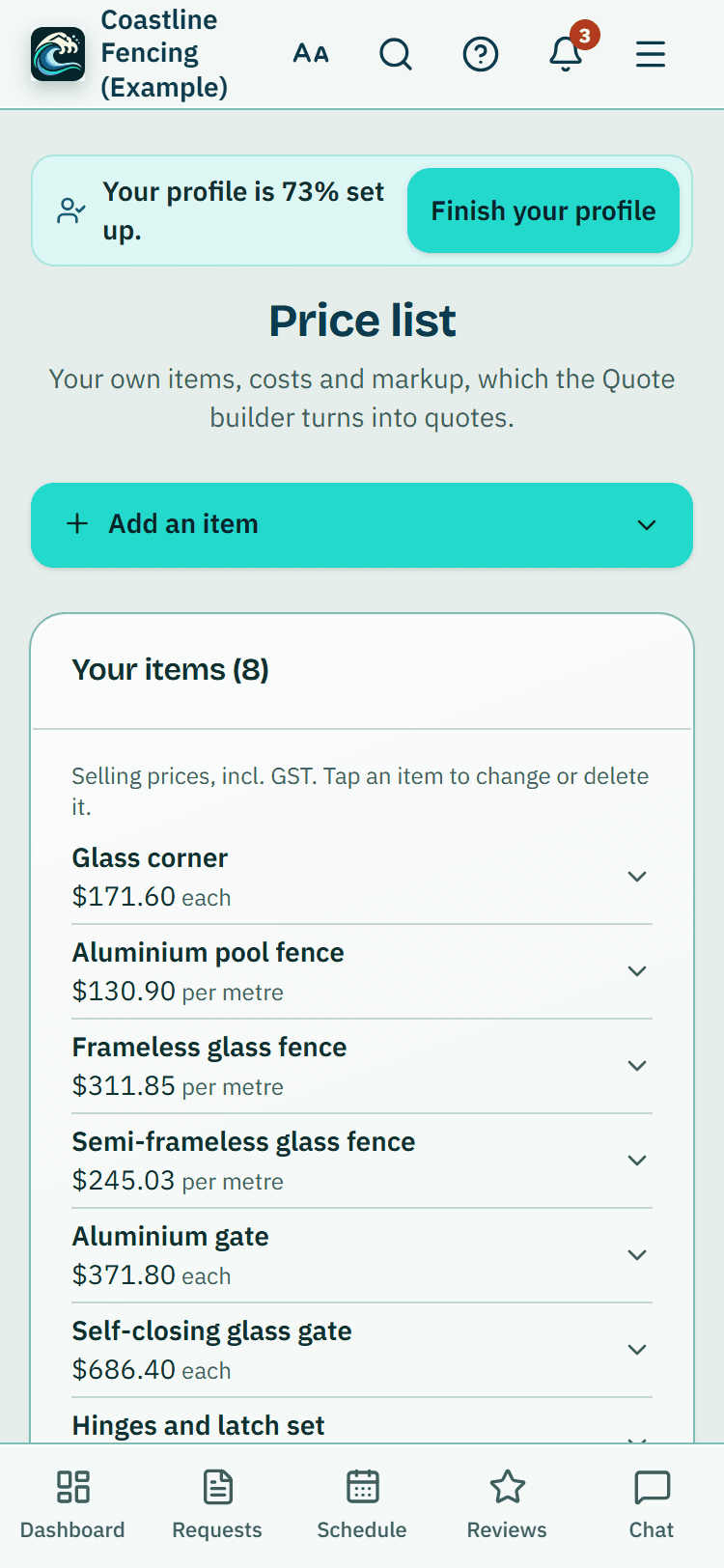
2. Your prices, kept once
Each item has your cost, your markup and its unit: metres of glass or tubular fence, gates, corners, hinges, latches, labour hours. Import the lot from a spreadsheet. PoolPreCert never suggests a price.
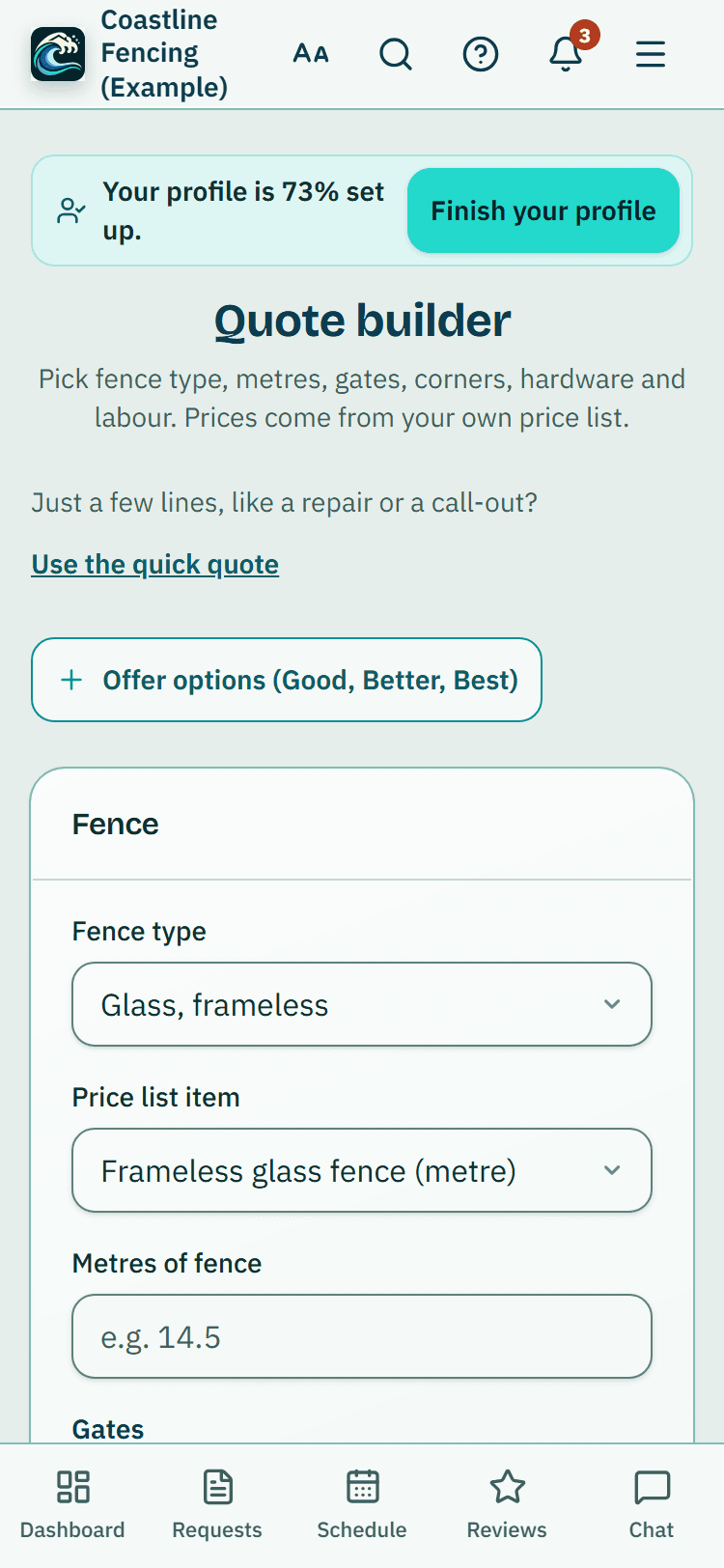
3. The quote, priced as you type
Choose the fence type, enter the metres, add gates, corners, hardware and labour, and the total incl. GST builds as you go. Offer up to three versions of the same job, each made as its own quote, so the customer picks one.
- A materials list with quantities and no prices goes to a supplier near the job in one tap; you send the email from your own address
4. The job on the schedule
Press Accepted on the quote, then Book the job. Put up to 4 people on it, see clashes flagged, and keep site notes such as the side gate code where everyone sees them before they arrive.
Money in, without chasing
Deposits, the final invoice and the follow-up email, worked out from the quote.
A booking confirmation, a day-before reminder, On my way and a quote reminder go to the customer's mobile with the email. Off until you switch it on, and each text gives your phone number because it can't take replies.
Staff ask for time off, clock on and off with a button on their dashboard, put time on a job and message the team. You approve each week's hours.
Choose 10%, 30%, 50%, another percentage or an amount. The app shows QBCC's deposit limit for a job that size and how much room is left, and warns before you go over it.
Invoice the rest lists the quote's lines and takes off the deposit already invoiced, so the customer is never billed twice and GST isn't charged twice.
Switch on Follow-ups and a quiet quote or an unpaid invoice gets one email after the days you choose, from your business name, with your phone and email.
Before and after photos
Give a before and an after photo the same label to see them side by side, and mark them with circles, arrows or text.
What the job really made
Costs and profit on the job takes your hours, materials and other costs and sets them against the invoice, for your own use.
Glass, aluminium, hardware and timber suppliers listed nearest first, from their own websites with the date checked. Star up to five you use.
QBCC's deposit limits, as the app applies them
- Work of $3,300 or less: up to 20%.
- $3,301 to $19,999: up to 10% of the contract price.
- More than $20,000: up to 5% of the contract price.
QBCC's page doesn't say which row exactly $20,000 falls under, and it allows up to 20% in limited cases, so the app only warns. Check QBCC's page for your contract.
Source: QBCC, Deposits and progress payments (page reviewed 27 Jun 2025; read 5 Nov 2026).
What it does, and what it doesn't
What it does
- Brings you repair and new-fence requests from homeowners near you, with their notes when they agree
- Prices quotes from your own list, with GST worked out if you are registered
- Makes deposit and final invoices from the quote and checks deposits against QBCC's limits
- Keeps the job, its crew, site notes, photos and costs together
What it does not do
- Say a fence meets the standard: only a licensed pool safety inspector decides
- Let the customer accept or sign a quote online: you press Accepted when they say yes
- Take card payments or hold money: invoices show your bank account
- Order materials for you: suppliers get an email you send yourself
- Connect to QuickBooks: Xero is the only accounting software it connects to
Before you quote, our guide to what goes on a pool fence quote and the installer's checklist cover the paperwork side. The quote builder has its own page with every button named.
What the fencing app costs
Your listing: no charge. Quote requests: no charge until at least 17 October 2027.
The app (quote builder, price list, schedule, jobs and invoices): Starter $49 or Business $99 a month, incl. GST.
Pilot offer: the first 20 businesses to sign up get 3 months at no charge (no card needed), then 25% off for as long as you stay a member. The months at no charge count from the day you sign up. 17 of 20 places left. After the places are gone, both plans start with a 14-day trial, no card required.
No commissions and no per-job fees.
Start 3 months at no chargeFind your listingCompare the plans
The same app, set up for other trades: Pool inspector app: the licensed inspector's day, from booking to the To lodge list. Pool builder app: project enquiries, itemised quotes, progress invoices and crews.
Common questions
Can a homeowner accept my quote online?
Not for a quote made in PoolPreCert: it goes as a PDF by email, or you download it. When the customer says yes, open the quote and press Accepted. From there you can book the job, invoice a deposit or invoice the whole quote.
Does the app check QBCC's deposit limit?
When you invoice a deposit from an accepted quote, it shows QBCC's limit for a job that size (20%, 10% or 5%) and how much is left under it, counting deposits already invoiced. Going over gives a warning, not a block: QBCC's own page is the rule, and the decision is yours.
Do I need Xero or QuickBooks?
No accounting software is needed. PoolPreCert numbers your quotes and invoices and works out the GST if you tell it you are registered. You can connect Xero if you already use it. QuickBooks is not connected.
Does a quote or invoice say the fence meets the standard?
No. A quote prices the work and an invoice records what is owed. Only a licensed pool safety inspector decides whether a pool barrier meets the standard.
What does the fencing app cost?
Claiming your listing has no charge, and quote requests have no charge until at least 17 October 2027. The quote builder, price list, schedule and invoices are part of a business membership: Starter $49 or Business $99 a month, incl. GST. The first 20 businesses to sign up get 3 months at no charge (no card needed), then 25% off for as long as you stay a member. After the places are gone, plans start with a 14-day trial, no card required.
Price your next fence in it
Open the fence contractor demo with made-up jobs, or start your own and load your price list first.
Related help articles
Sources
- QBCC: Deposits and progress payments (page reviewed 27 Jun 2025; read 5 Nov 2026) (opens in a new tab)
- QBCC: Swimming pool construction, installation and maintenance (page reviewed 31 Aug 2021, with a note that fees were increased on 1 Jul 2026; read 6 Nov 2026) (opens in a new tab)
- QBCC: Structural landscaping (trade) (page reviewed 31 Aug 2021; read 6 Nov 2026) (opens in a new tab)
- QBCC: Pool fences (page reviewed 12 May 2025; read 13 Nov 2026) (opens in a new tab)
Last checked against QBCC guidance: 19 November 2026.