

For fence contractors and pool builders
Pool fencing price list: your own prices, and nearby suppliers to ask for materials prices
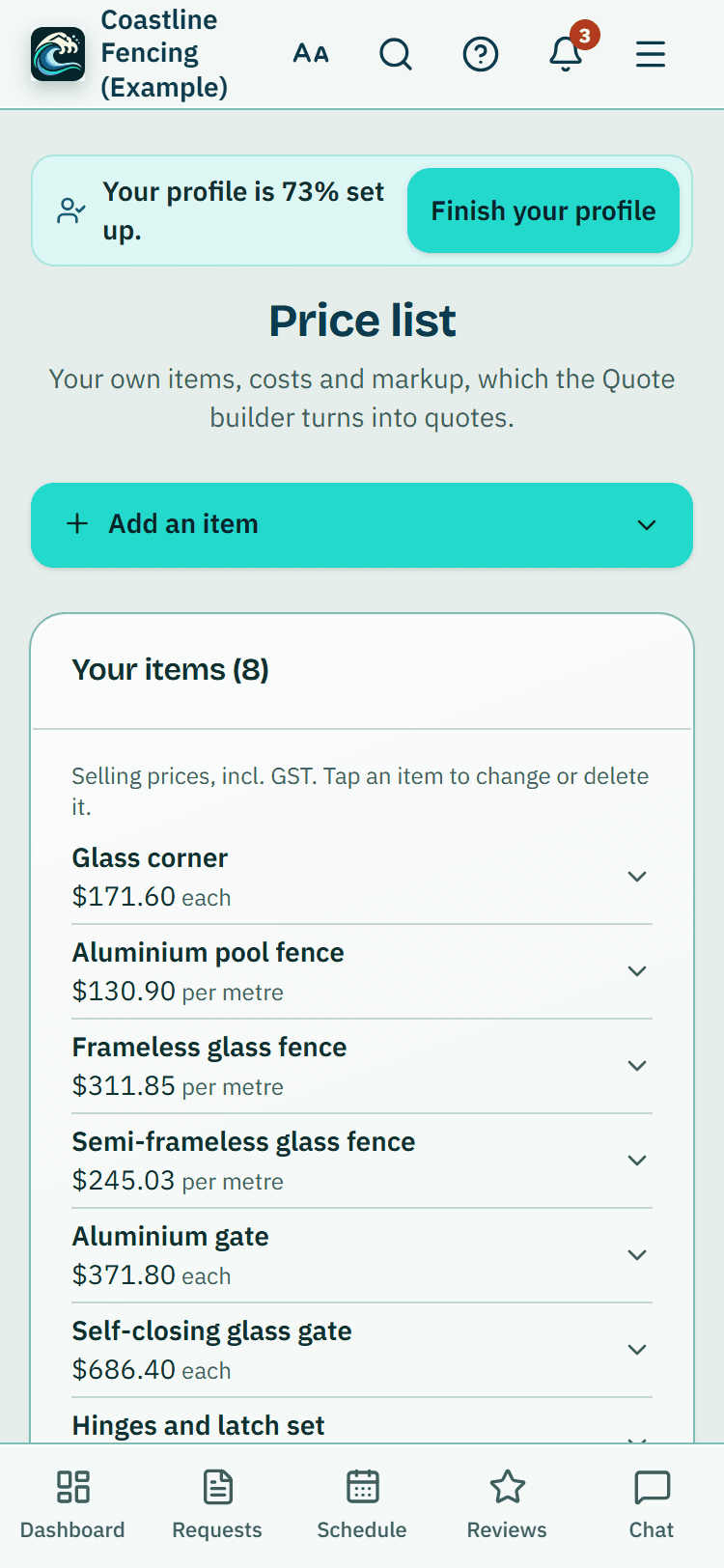
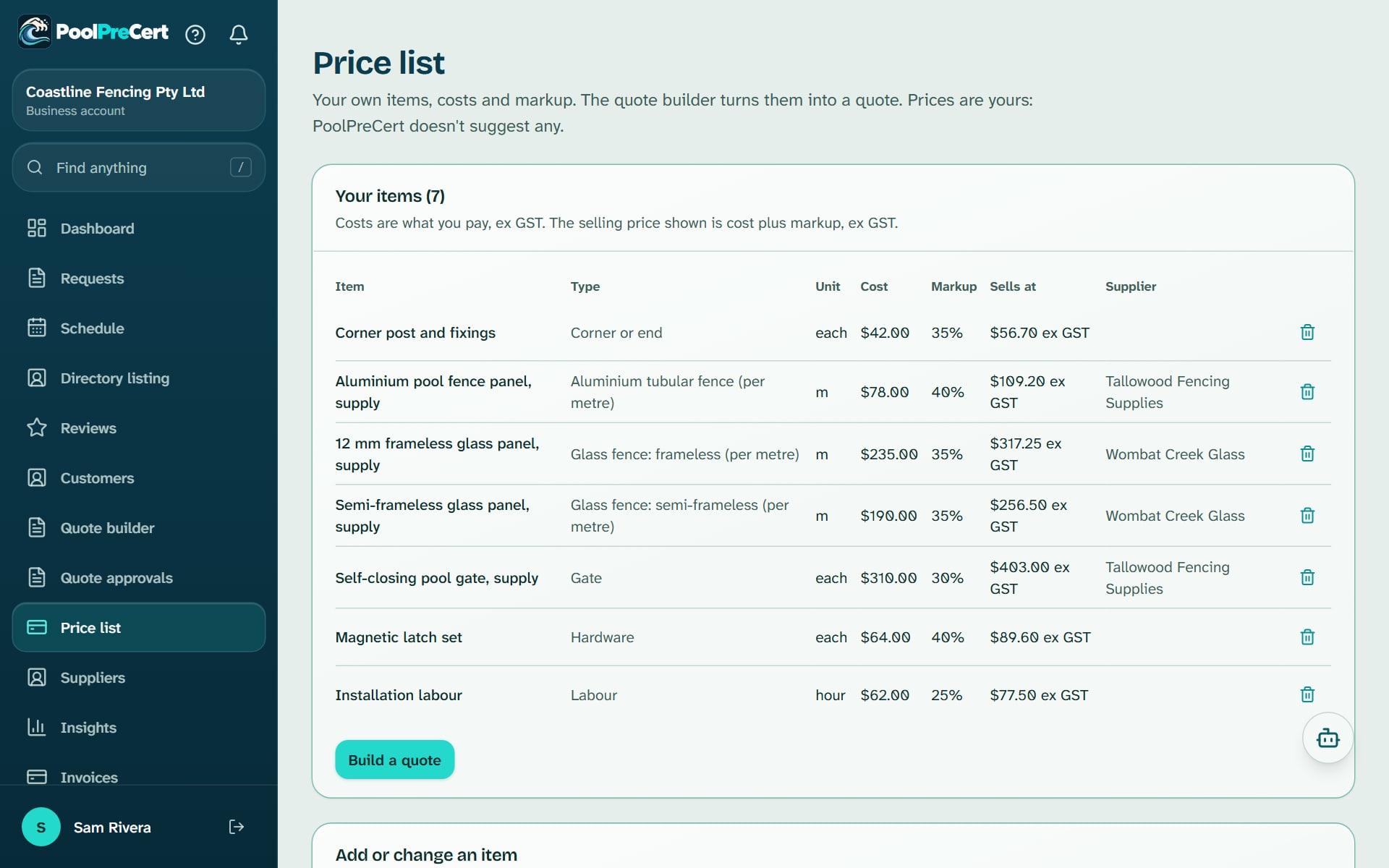
The price list holds the items you buy and sell, with your cost, your markup and the price you sell at.
Read more
Suppliers lists fencing, glass and hardware suppliers near a job, and builds the email that asks them to quote on a materials list. Together they feed the quote builder.
Pilot offer: the first 20 businesses to sign up get 3 months at no charge (no card needed), then 25% off for as long as you stay a member. 17 of 20 places left. How it works
 Pilot offer: the first 20 businesses to sign up get 3 months at no charge (no card needed), then 25% off for as long as you stay a member. 17 of 20 places left.
The demo is your own private copy with made-up example data. No sign-up, and it's deleted automatically.
Prices include GST.

What you get with Price list and suppliers
A price list for pool fencing quotes
Think of it as your trade price list for pool fencing, the price book your quotes are built from. Change a price and only new quotes use it: a quote you have already made stays as it was.
Read more
Each item has a name, a unit (such as m, each or hour), your cost excluding GST, a markup percentage and, if you like, the supplier you buy it from. The Sells at column is your cost plus the markup, excluding GST. These are your prices: PoolPreCert does not supply or suggest any.
Under What it is you say what kind of item it is: a glass fence (frameless or semi-frameless), an aluminium tubular fence, another fence, a gate, a corner or end, hardware, labour or other. The quote builder uses that to find the item. To change an item on a phone, tap it in Your items, change it and save; on a computer, add it again with the same name and unit. On a phone the rows show the selling price incl. GST if you are registered for GST. A list holds up to 500 items.
Import your price list from a spreadsheet
To import a price list from a spreadsheet, save it as a CSV and press Choose a CSV file under Import from a CSV. The columns are item, unit, cost, markup percent, and optionally supplier and a type. Press Download template to start from a correct file.
Read more
You see a preview before anything is saved. Each row is marked as new, an update to an item with the same name and unit, a duplicate in the file (the last one wins) or an error. Up to 1,000 rows are read. If a row has no type, PoolPreCert guesses one from the item name, and you can correct it afterwards.
Pool fence suppliers near the job
To find pool fence suppliers near a job, open Suppliers, pick a Category, enter the suburb you are measuring from and press Show suppliers. The categories are glass pool fencing, aluminium and tubular fencing, hardware and gates, timber, concrete and general fencing.
Read more
Suppliers are shown nearest first by distance, with those that ship statewide or online last. Press Star as a preferred supplier on up to five, and they come first with a Your supplier badge. Order is by distance only: nobody can pay to be listed or ranked higher, and a listing is not an endorsement.
Where the supplier details come from
Every supplier shows the date its details were checked and a Source link to the business's own website. They are not yet confirmed by the business. If a detail is wrong, press Report, correct or remove, and the team acknowledges correction requests within 2 business days.
Read more
Some areas have no suppliers until more are added.
Ask suppliers for materials prices
To ask suppliers for materials prices, press Request a quote on a supplier. List the materials (up to 40 rows), then fill in Delivery suburb, Needed by, Your business, Your name, Phone and Email.
Read more
Starred suppliers are ticked for you, and each supplier gets its own email so none of them sees the others.
PoolPreCert builds the email but sends nothing. Press Open in my email app so it goes from your own address, or Copy message. A supplier with no published email shows Use their contact form instead. The email asks for the price, whether it includes GST, the lead time, any delivery charge and whether you need a trade account. PoolPreCert only counts that a request was prepared, not what it said.




How to start
Add your items
Open Price list and fill in Item, Unit, Your cost and Markup, or import a CSV.
Build a quote
Press Build a quote on the price list to go to the quote builder.
Find suppliers
Open Suppliers, choose a Category, enter your suburb and press Show suppliers.
Prepare the request
Press Request a quote, add the materials and tick who to send it to.
Send it yourself
Press Open in my email app, or Copy message, and send it from your own account.
What Price list and suppliers does and does not do
What it does
- Keeps your costs, markup and selling prices in one list
- Imports your list from a spreadsheet (CSV)
- Finds fencing, glass and hardware suppliers near a job
- Prepares a materials request that you send from your own email
What it does not do
- It does not supply market prices. The price list is yours alone.
- It does not order materials or take payment for them. Prices and stock are between you and the supplier.
- It does not send emails to suppliers for you. You send them from your own email.
- It does not recommend a supplier or vouch for a supplier's products or prices.

Features that go with it
Pool fence quote builder
Turn a few answers about a pool fence job into a priced quote from your own price list. Offer Good, Better and Best. PoolPreCert numbers and emails it.
Quotes and invoices
Make a quote or invoice from a job, property or customer, in PoolPreCert with no accounting software or in your own Xero. Optional follow-up emails chase quiet quotes.
Directory listing
Your QBCC licence probably has a listing already. Claim it, add your details and areas, and homeowners can find you, call you and send requests.


Guides that give the background
Step by step instructions: Help centre. All features are listed on the features page.
Common questions
Can I import my price list from a spreadsheet?
Yes. Save it as a CSV with the columns item, unit, cost, markup percent, and optionally supplier and a type. Press Download template to start from a correct file, check the preview, then save. Up to 1,000 rows are read, and a list holds up to 500 items.
Does PoolPreCert show supplier prices?
No. It lists suppliers and builds an email asking each one for their price, whether it includes GST, the lead time, any delivery charge and whether you need a trade account. You send that email yourself, and prices stay between you and the supplier.
Does the markup include GST?
No. Your cost and the markup are excluding GST, so the selling price is too. If you are registered for GST, the list also shows the selling price incl. GST. When you build a quote, the builder adds GST if you are registered and shows the total incl. GST. If you use Xero and have connected it, Xero applies GST using the tax setting on your Xero item.
Why can I not find a supplier near me?
Suppliers are listed from their own websites, so an area can have none until we add them. Try another category or choose a suburb further away.
Can a supplier pay to be listed first?
No. The order is by distance only, with the suppliers you star shown first in your own view. Listings are not endorsements.
Does it cost extra?
No separate charge. It is part of the contractor and builder app. Starter is $49 a month and Business is $99 a month (incl. GST). The first 20 businesses to sign up get 3 months at no charge (no card needed), then 25% off for as long as you stay a member. After the places are gone, plans start with a 14-day trial, no card required.

What it needs and what it costs
The price list and Suppliers are part of the contractor and builder app with no separate charge. See the plans and prices. The first 20 businesses to sign up get 3 months at no charge, no card required. Prices include GST. Start 3 months at no charge
Try it before you pay
The first 20 businesses to sign up get 3 months at no charge, no card required. Prices include GST. The demo at the top of the page needs no sign-up.