

For fence contractors and pool builders
Pool fence quote software: build each quote from your own price list
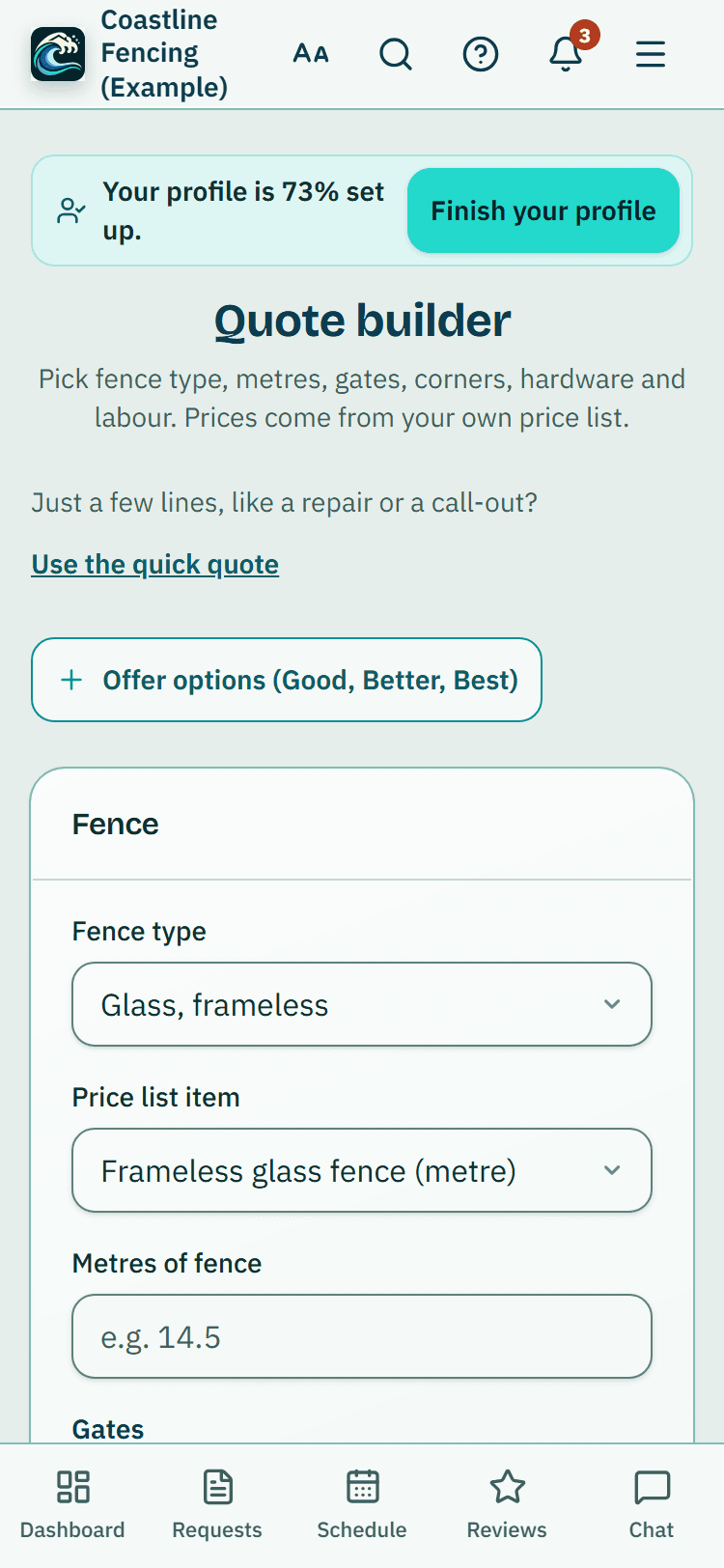
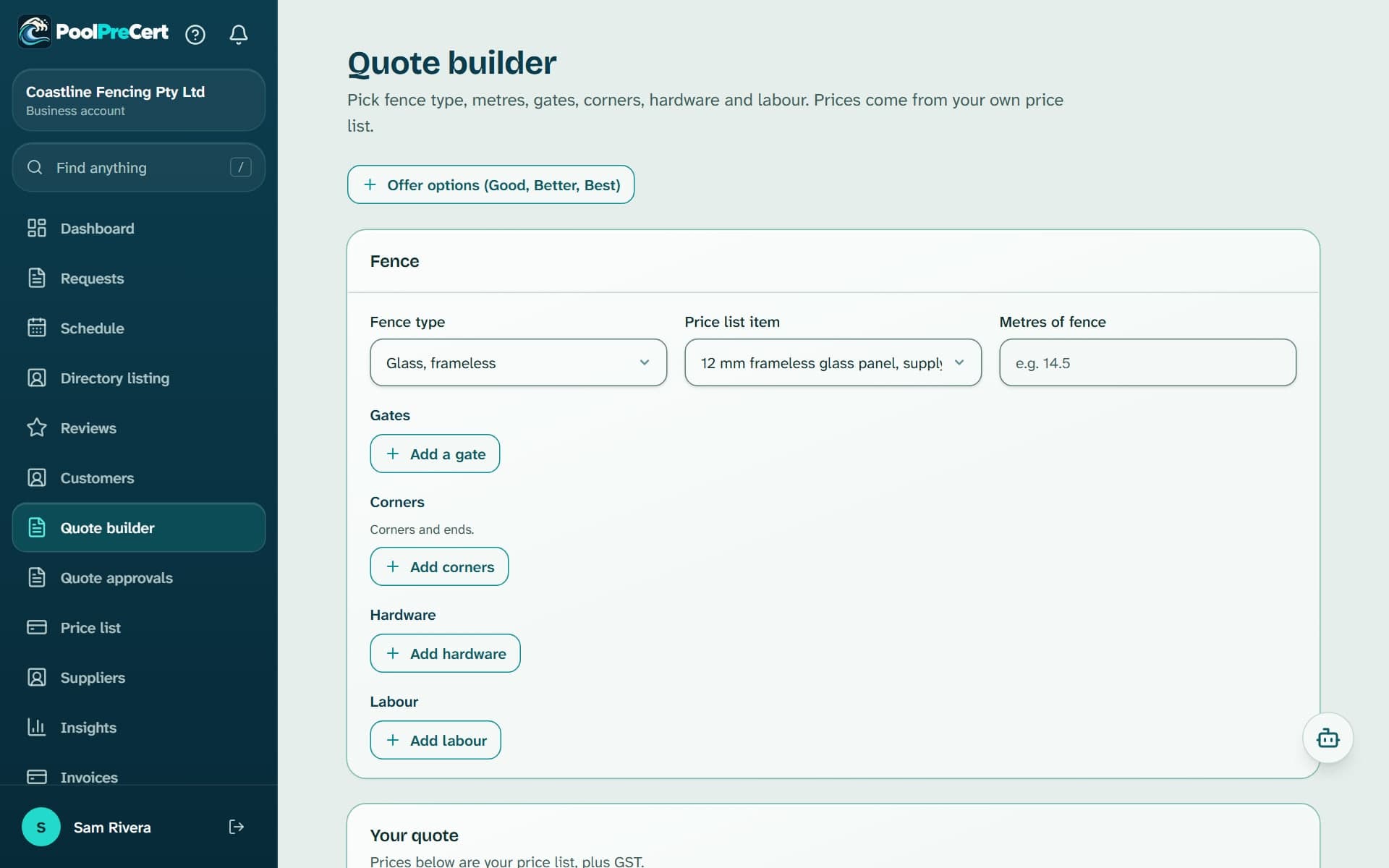
The quote builder is for pool fence contractors and pool builders. You pick the fence type, enter the metres, add gates, corners, hardware and labour (builders: items and labour), and it prices every line from your own price list.
Read more
The finished quote is made and numbered in PoolPreCert, with a PDF you can email to the customer. If you already use Xero and have connected it, it is created there instead.
Pilot offer: the first 20 businesses to sign up get 3 months at no charge (no card needed), then 25% off for as long as you stay a member. 17 of 20 places left. How it works
 Pilot offer: the first 20 businesses to sign up get 3 months at no charge (no card needed), then 25% off for as long as you stay a member. 17 of 20 places left.
The demo is your own private copy with made-up example data. No sign-up, and it's deleted automatically.
Prices include GST.

What you get with Pool fence quote builder
Pool fence quote software built from your price list
This pool fence quote app turns a few answers into a priced quote. Everything on the screen comes from your price list, so a price you change there changes every new quote.
- Fence type: glass frameless, glass semi-frameless, aluminium tubular or other. Only types you have items for are offered.
- Price list item and Metres of fence, including part metres such as 14.5.
Read more
- Gates, corners, hardware and labour: press Add a gate, Add corners, Add hardware or Add labour, pick an item and enter how many (hours or jobs for labour).
- Under Your quote you see each line, the Subtotal (ex GST), the GST and the Total incl. GST. If you are not registered for GST, no GST is added. With Xero connected, your Xero item decides the tax and Xero gives the final figures.
- Add a customer name (required), email, phone, job site and a quote heading, then press Create quote. PoolPreCert gives it the next quote number (QU-0001, QU-0002 and so on) and you find it on the Invoices page and on the customer's page.
Good, Better and Best quote options
Good, Better and Best quote options let a customer compare versions of one job. Press Offer options (Good, Better, Best) to build up to three of them.
Read more
The new option starts as a copy of the one you are on, so you only change what differs: a different fence, more labour, upgraded hardware. Each option shows its own total on its tab.
Each option is made as its own quote, so your customer accepts one. The button changes to Create 2 quotes or Create 3 quotes.
Start a quote from a homeowner request
To build a quote from a customer request, start in your Requests inbox. When a homeowner asks you for a quote through your directory listing, press Build a quote for this request.
Read more
A new fence or a pool builder's request opens the Quote builder with their details and what they asked for. A fence repair opens Create quote with the customer chosen. Check the details before you create the quote.
A materials list for your supplier
The Materials list card at the bottom shows what a supplier would need to quote on: the fence, gates, corners and hardware with quantities. There are no prices and no labour on it.
Read more
Materials list for a supplier carries it across to Suppliers, so you can ask for a materials price without retyping. This works even before you have answered the GST question under Settings, Invoicing.
Quote approvals
Some agencies and businesses keep a note when they approve a contractor's quote. If they give your QBCC licence number, you see it under Quote approvals: the quote number, who approved it, the date, the property and any amount, with a link to your quote.
Read more
Opening the page marks them seen. You cannot change them, and they are the other business's own notes. Check an approval with them directly before you start work.
Who can open it
Pool fence contractor and pool builder accounts have it in the menu. Pool builders get it without the fence questions, pricing items and labour from their own list with Add an item and Add labour.
Read more
You need an item list first and a role that can write; a viewer cannot create quotes. An owner or admin can turn off Prices, quotes and invoices for one person on the Team page.






How to start
Fill in the price list
Add your items on the Price list page, or import a CSV. The builder shows a prompt until there is at least one item.
Open Quote builder
Choose Quote builder in the menu, or start from Build a quote for this request on a new fence request.
Build the job
Add the fence type, metres, gates, corners, hardware and labour, or for a pool builder, items and labour.
Offer options if you want
Press Offer options (Good, Better, Best) and change what differs on each tab.
Create the quote
Tick Email it to the customer now if you want the PDF sent, then press Create quote. The first time, answer the GST question under Settings, Invoicing.
What Pool fence quote builder does and does not do
What it does
- Builds a priced pool fence quote from your own price list
- Offers Good, Better and Best options
- Starts from a homeowner's request
- Makes a materials list for your supplier
What it does not do
- It does not say a fence meets the QBCC standard. It prices what you enter, and only a licensed pool safety inspector decides about a fence.
- It does not suggest prices or look up market rates. Every price is yours.
- It does not take the customer's acceptance or payment. When the customer says yes, you open the quote, press Accepted, then Book the job and Create invoice from this quote.
- It does not give tax advice. GST is added only if you say you are registered, as one eleventh of a price that includes it.
- It does not offer a private link for the customer to accept online. The quote goes as a PDF by email, or you download it.

Features that go with it
Price list and suppliers
Keep your costs and markup for fencing materials and labour in one list. Then find fencing, glass and hardware suppliers near a job and email them a materials list.
Quotes and invoices
Make a quote or invoice from a job, property or customer, in PoolPreCert with no accounting software or in your own Xero. Optional follow-up emails chase quiet quotes.
Requests inbox
Requests from your directory listing, self-checks and Website button arrive in one inbox, with the homeowner's details, message and status steps.

Guides that give the background
Step by step instructions: Help centre. All features are listed on the features page.
Common questions
What should a pool fence quote include?
The builder puts the fence type, the metres, and any gates, corners, hardware and labour on every quote, each priced from your own list. For the wider question of what a quote should cover, read our guide on what to include on a pool fence quote.
Can I offer Good, Better and Best options?
Yes. Press Offer options (Good, Better, Best) for up to three versions. Each one is made as its own quote with the option name in its heading, and the customer accepts the one they want.
Can I build a quote from a homeowner's request?
Yes. In your Requests inbox press Build a quote for this request. A new fence or a pool builder's request opens the Quote builder, filled in. A fence repair opens Create quote with the customer chosen.
Does the quote say my fence is OK?
No. It prices what you enter and says nothing about a fence's condition. Only a licensed pool safety inspector decides about a fence.
Do I need Xero to send a quote?
No. With nothing connected, the builder makes the quote in PoolPreCert, numbers it, works out the GST if you are registered and can email the PDF. Answer the GST question and add your business details once under Settings, Invoicing. If you already use Xero, connect it under Settings, Integrations and quotes are created there instead. If the builder says it is not switched on for your account, email support@poolprecert.com.
Does it cost extra?
No separate charge. It is part of the contractor and builder app. Starter is $49 a month and Business is $99 a month (incl. GST). The first 20 businesses to sign up get 3 months at no charge (no card needed), then 25% off for as long as you stay a member. After the places are gone, plans start with a 14-day trial, no card required.

What it needs and what it costs
The quote builder is part of the contractor and builder app with no separate charge. It needs your own price list, and it does not need Xero or any other accounting software. See the plans and prices. The first 20 businesses to sign up get 3 months at no charge, no card required. Prices include GST. Start 3 months at no charge
Try it before you pay
The first 20 businesses to sign up get 3 months at no charge, no card required. Prices include GST. The demo at the top of the page needs no sign-up.