

For pool safety inspectors, fence contractors and pool builders
Text reminders for pool inspections and jobs, sent from your diary
Customer texts add a short text to the emails your customers already get about a visit they booked or a quote you sent. There are four kinds: a booking confirmation, a day-before reminder, On my way and a quote reminder.
Read more
Each one names your business and gives your phone number. Texting is off until an owner or admin switches it on, one kind at a time, and the texts are included in your plan up to a monthly number.
Pilot offer: the first 20 businesses to sign up get 3 months at no charge (no card needed), then 25% off for as long as you stay a member. 17 of 20 places left. How it works
 Pilot offer: the first 20 businesses to sign up get 3 months at no charge (no card needed), then 25% off for as long as you stay a member. 17 of 20 places left.
The demo is your own private copy with made-up example data. No sign-up, and it's deleted automatically.
Prices include GST.

What you get with Customer texts
What your customer receives
Each text is a plain fact about a visit the customer booked or a quote you sent. It carries no offers and no result of any inspection.
Read more
Here is a booking confirmation as it arrives, written for a made-up business: Example Pool Checks: Hi Sam, your booking is confirmed for Mon 24 Nov at 9:30 am. This number can't take replies; call 07 5550 0123. Reply STOP to opt out.
The day-before reminder reads the same way, with a reminder of the visit and its day and time. An On my way text says you are on your way, about 15 minutes. A quote reminder says a quick reminder about the quote QU-0041 we sent you, or just following up on it for the second one. A quote reminder never shows a price or a link.
- Every text starts with your business name and ends with the opt-out line.
- Your business phone number comes from your business details, so check it is filled in.
- Texts go only to Australian mobile numbers in your address book.
The four kinds of text, and what sends each one
A booking confirmation goes a moment after the confirmation email. The day-before reminder goes after the reminder email. If a customer has a mobile number but no email address, the booking confirmation goes as a text on its own, and you can press Text a confirmation now on the job.
Read more
Quote reminders go with each automatic quote reminder you set up under Settings, Follow-ups. Invoice reminders are never texted.
On my way is a button you press yourself. On the day of a visit, open the job, choose about how long until you arrive (15, 10, 20, 30, 45 or 60 minutes) and press Tell the customer you're on your way. It sits right under the main buttons on the job, so it is one tap on a phone. If the customer has no mobile number, or texting is off, it sends one email instead.
Turning it on, and trying it on yourself
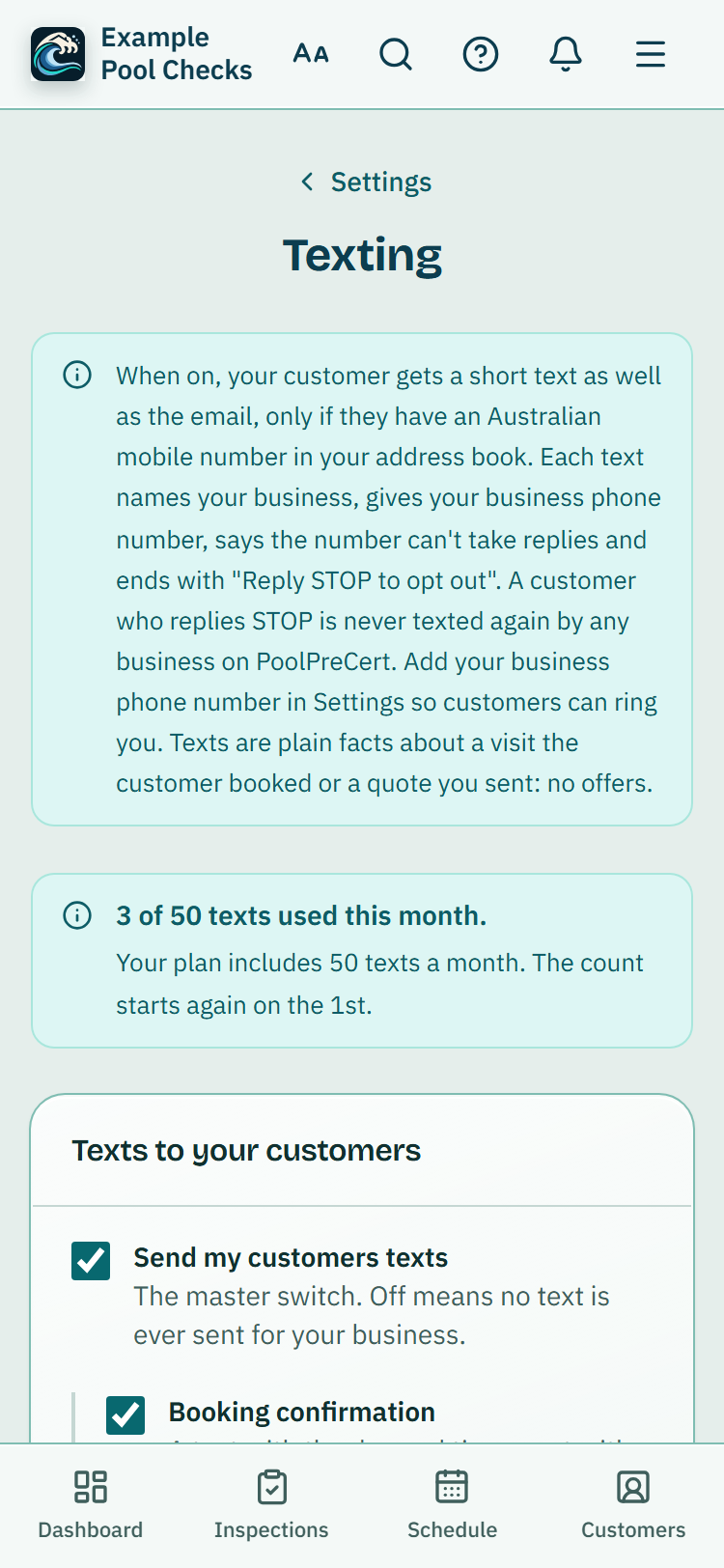
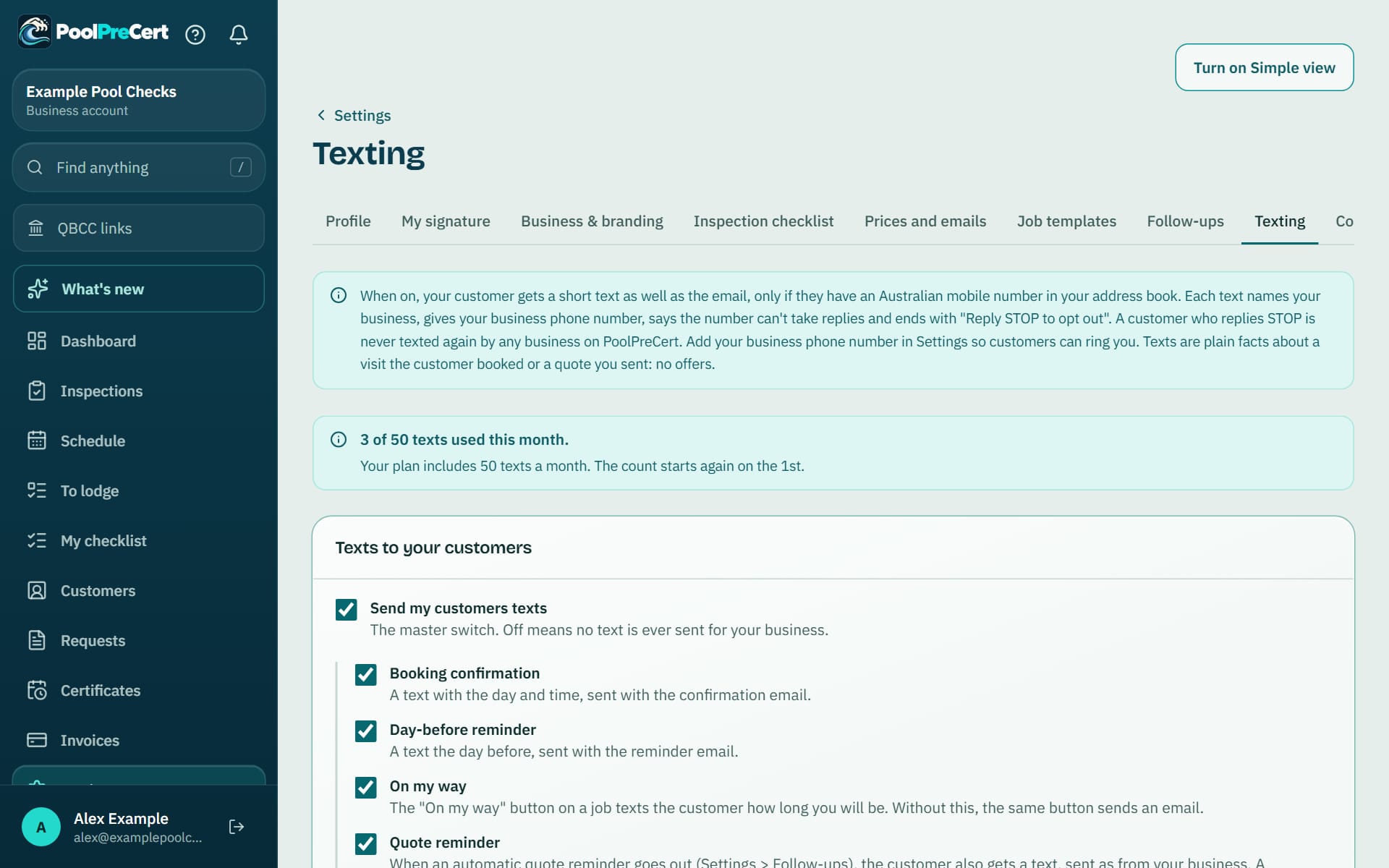
An owner or admin opens Settings, then Texting, ticks Send my customers texts and ticks the kinds to send: Booking confirmation, Day-before reminder, On my way and Quote reminder. Nothing is sent to anyone until you do that and press Save.
Read more
To see exactly what a customer gets, press Send a test text to my mobile. It goes to the mobile number on your own profile, at most 5 an hour, and does not count against your monthly allowance. The Recent texts list on the same page shows the last 15 texts with their status, such as Sent, Delivered or Didn't send.
How many texts are included
Texts are included in your plan, up to a number each calendar month in Brisbane time: 50 on Starter and 300 on Business. Larger businesses can ask about a custom number.
Read more
Settings, Texting shows how many you have used this month, and the owner and admins get a notice in the app at 80 percent used.
If you reach the number, no more texts go until the 1st. Emails are not counted, so every customer still gets their email as usual.
STOP, replies and what stays private
All texts go out from one PoolPreCert number, and each one says it cannot take replies and gives your phone number, so a customer who wants to talk rings you.
Read more
A customer who replies STOP is not texted again by any business on PoolPreCert, and can reply START to receive texts again. Words such as UNSUBSCRIBE or END count as STOP.
If a customer does reply with something else, PoolPreCert matches it to the one business that texted that number in the last 14 days, and only that business sees it, under Replies from customers on the Texting page. If two businesses texted the same number in that time, the reply is held and neither business sees it. Nobody ever sees another business's reply.


How to start
Check your phone number
Make sure your business phone number is in your business details, so each text can tell the customer who to ring.
Switch texting on
Open Settings, then Texting. Tick Send my customers texts, tick the kinds you want and press Save.
Send yourself a test
Press Send a test text to my mobile and read the text on your phone. Check the wording is what you want your customers to see.
Let the bookings do the work
A customer with an Australian mobile number in your address book now gets the text a moment after the email.
Press On my way
On the day of a visit, open the job, choose how long you will be and press Tell the customer you're on your way.
What Customer texts does and does not do
What it does
- Texts a booking confirmation and a day-before reminder to your customer
- Sends On my way when you press it, and a reminder about a quote you sent
- Names your business and gives your phone number in every text
- Stays off until you switch it on, with a monthly number included in your plan
What it does not do
- It does not read or answer replies. The text says so and gives your phone number instead.
- It does not text landlines or numbers that are not Australian mobiles, and nothing is sent to anyone who replied STOP.
- It does not replace the email. A customer with an email address still gets the email, and the text is an extra.
- A day-before reminder still needs an email address on the customer. There is no text-only reminder yet.
- It does not promise delivery. The Recent texts list shows what each text did.

Features that go with it
Schedule
Your jobs by day, week or month, with drag and drop, repeat visits, clash warnings, best order for the day and a private calendar link.
Booking page
Give customers a link to a page of open times built from your hours. Every booking arrives as a request you approve, move or decline.
Quotes and invoices
Make a quote or invoice from a job, property or customer, in PoolPreCert with no accounting software or in your own Xero. Optional follow-up emails chase quiet quotes.
Customers
An address book that ties each customer to their properties, jobs and paperwork, with dated notes, a private link, CSV import and a duplicate finder.



Step by step instructions: Help centre. All features are listed on the features page.
Common questions
Do my customers have to agree to be texted?
The texts are about a visit the customer booked with you, and each one says how to opt out. Your customers' details are yours, so only add a mobile number for a customer who gave it to you.
Why did a text not go?
The usual reasons are a number that is not an Australian mobile, a customer who replied STOP, a switch that is off, or the monthly number reached. The Recent texts list shows Not sent or Didn't send, and the Texting page shows your monthly use.
Can I change the wording of a text?
No. The wording is fixed so every text names your business, gives your phone number and carries the opt-out line. You can choose which kinds to send.
What happens if a customer replies?
The text says the number cannot take replies. If a customer replies anyway, only the business that texted them recently sees it, on the Texting page. A reply of STOP stops texts from every business on PoolPreCert.
What does it cost?
Texts are included in the plans, up to 50 a month on Starter and 300 on Business. Starter is $49 a month and Business is $99 a month (incl. GST). The first 20 businesses to sign up get 3 months at no charge (no card needed), then 25% off for as long as you stay a member. After the places are gone, plans start with a 14-day trial, no card required.

What it needs and what it costs
Texts are included in the business plans, up to a set number a month; see the plans and prices for what each plan lists. See the plans and prices. The first 20 businesses to sign up get 3 months at no charge, no card required. Prices include GST. Start 3 months at no charge
Try it before you pay
The first 20 businesses to sign up get 3 months at no charge, no card required. Prices include GST. The demo at the top of the page needs no sign-up.