


Texts to your customers
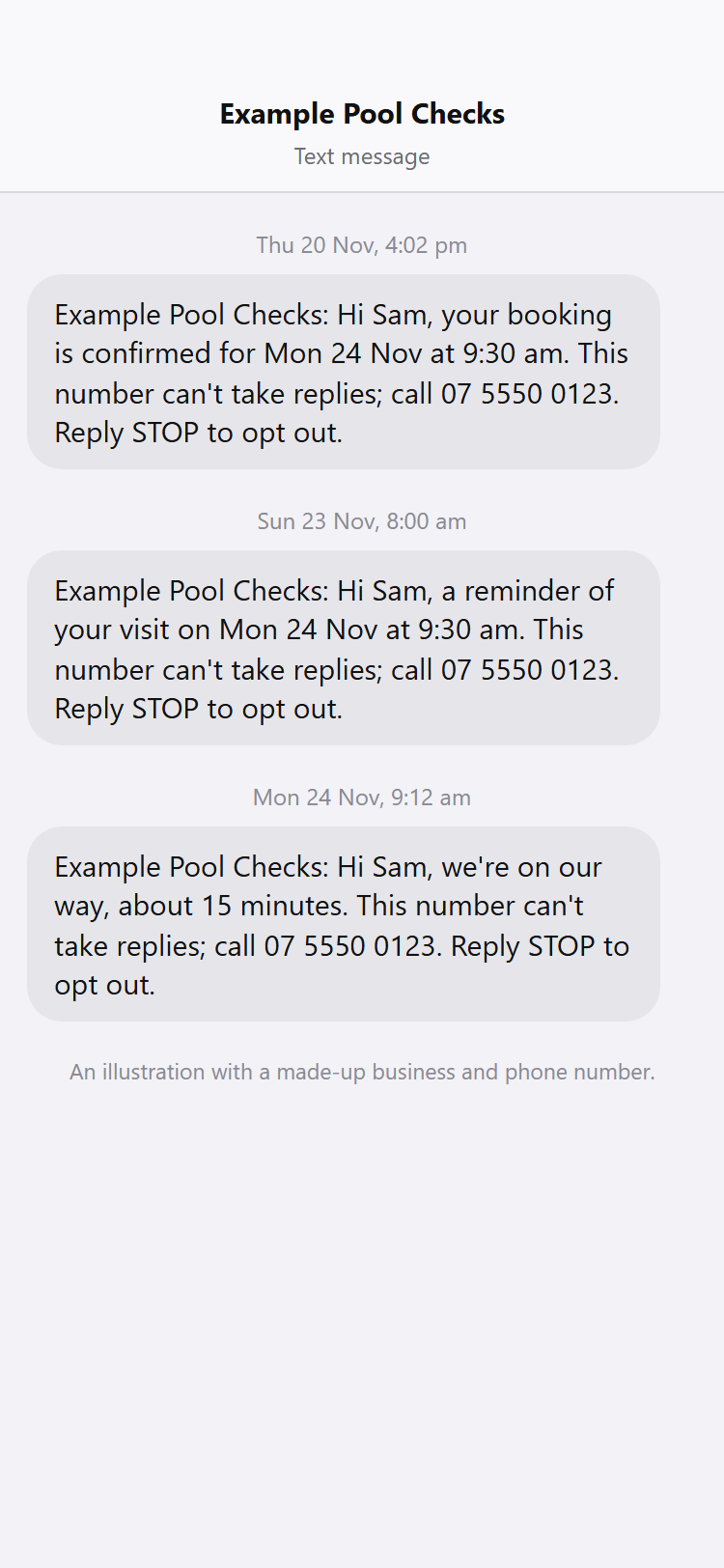
Switch on short texts for booking confirmations, day-before reminders, On my way and quote reminders, sent to a customer's mobile with the email.
For: Pool safety inspectors, Pool fence contractors, Pool builders · Last updated 21 November 2026
What it is
Texting adds a short text to the emails your customers already get about a visit they booked or a quote you sent. It is off until an owner or admin switches it on, one kind of text at a time.
Who it is for
Owners and admins switch it on. Anyone who can edit jobs can press On my way.
How to do it
Open Settings, then Texting.
Tick Send my customers texts, then tick the texts you want: Booking confirmation, Day-before reminder, On my way, Quote reminder. Press Save.
Press Send a test text to my mobile to see what a customer gets.
It goes to the mobile number on your profile, at most 5 an hour.
From then on, a customer with an Australian mobile number in your address book gets the text a moment after the email.
The Recent texts list on the same page shows what went out and whether it was delivered.
A customer who has a mobile number but no email address still gets the booking confirmation as a text, when you book them with the confirmation switch on (Settings, Schedule). On a job you can also press Text a confirmation now.
If you use automatic quote reminders (Settings, Follow-ups) and tick Quote reminder, the customer gets a text with each reminder, worded as from your business with your phone number to call. A customer with a mobile and no email gets the text alone. Invoice reminders are never texted.
On the day of a visit, open the job and choose about how long you will be, then press Tell the customer you're on your way.
It sends a text if texting is on and they have a mobile; otherwise it sends one email.
Good to know: Texting is off until an owner or admin switches it on, one kind of text at a time.
How many texts are included
Texts are included in your plan, up to a number each calendar month (Brisbane time): the Starter plan includes 50 and the Business plan includes 300. Settings, Texting shows how many you have used this month. Texts you send to yourself with the test button do not count.
Read more
If you reach the number, no more texts go until the 1st; the emails still go out as usual. At 80 percent used, the owner and admins get a notice in the app.
What a text says
Each text names your business, gives the day and time (or how long you will be, or the quote it is about) says the number can't take replies and gives your business phone number to call, and ends with Reply STOP to opt out.
Read more
A text is a plain fact about a visit the customer booked or a quote you sent. It has no offers and no promise about the result of any inspection.
Replies
Every text goes out from one PoolPreCert number and says it can't take replies, so a customer who wants to talk rings your business phone number (check it is filled in under your business details).
Read more
If a customer does reply, PoolPreCert matches the reply to the one business that texted that number in the last 14 days, and only that business sees it, under Replies from customers on Settings, Texting. If two businesses texted the same number in that time, the reply is held and neither business sees it. Nobody sees another business's replies.
STOP
A customer who replies STOP is never texted again, by your business or any other business on PoolPreCert, because all texts go from one number. They can reply START to receive texts again. A reply such as UNSUBSCRIBE or END is treated as STOP.
What it does not do
- Texting is off for every business until you switch it on, and nothing is sent to a landline or a number that is not an Australian mobile.
- It does not replace the email: a customer with an email address still gets the email, and the text is an extra. A text alone goes only to a customer who has a mobile and no email address.
- A day-before reminder still needs an email address; there is no text-only reminder yet.
- It does not answer replies. Each text says the number can't take replies and gives your phone number; a reply from a customer is shown only to the business it matches.
Common questions
Does a customer have to agree first?
The texts are about a visit the customer booked with you and each one says how to opt out. Your customers' details are yours, so only add a mobile number for a customer who gave it to you.
Why did a text not go?
The most common reasons are a number that is not an Australian mobile, a customer who replied STOP, or a switch that is off. The Recent texts list shows Not sent or Didn't send.
PoolPreCert helps you do and record your work. It does not decide whether a pool meets the Queensland standard. Only a licensed pool safety inspector does that.
Related articles
Automatic follow-ups for quotes and invoices
Switch on one polite email reminder for a quote with no answer and one for an unpaid invoice, sent once each to the customer's email.
Schedule basics: jobs, the calendar and reminders
How the Schedule works: the week board, adding and moving jobs, jobs with no time yet, repeating jobs, confirmation emails and starting a quote or invoice.

Was this helpful?
YesNo, tell us what was missing
This opens an email to the PoolPreCert team. Please do not include passwords or personal details.
Still stuck? Contact support
Email support@poolprecert.com and tell us what you were trying to do and which screen you were on. Please do not send passwords or card numbers. The PoolPreCert team will reply.