

For property managers
Preferred pool inspectors for agencies: save the ones you use and ask for an inspection
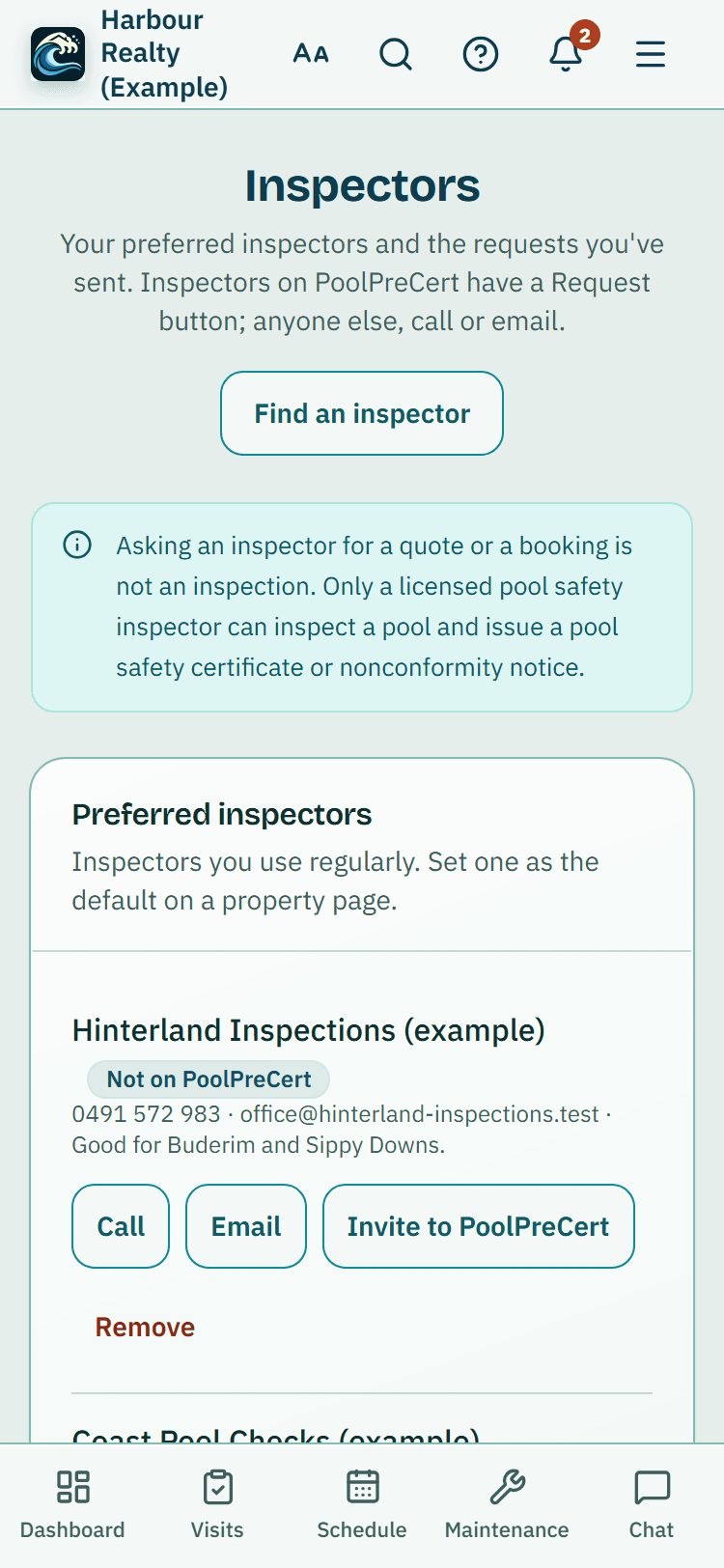
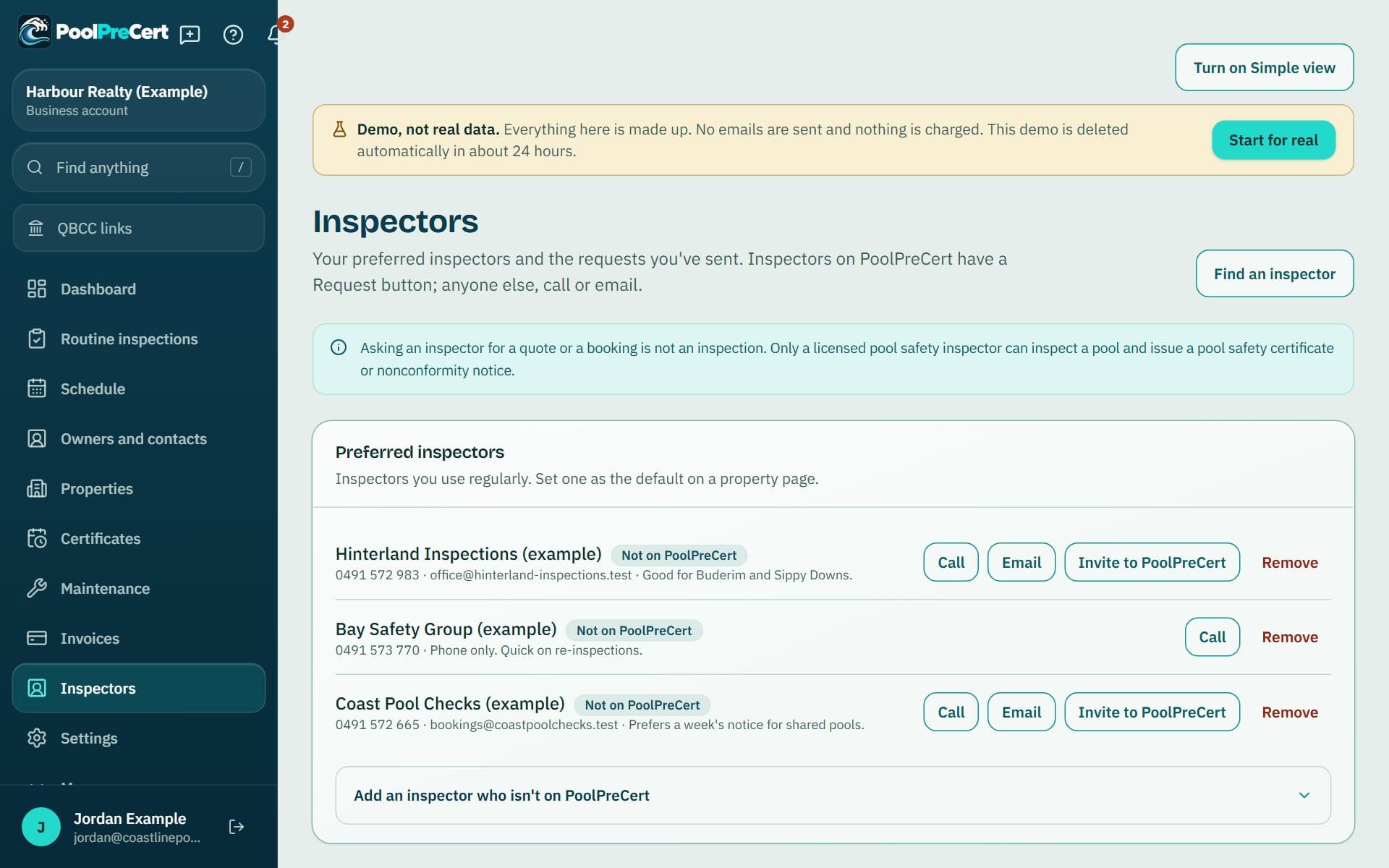
The Inspectors page keeps the pool safety inspectors you use, including ones who are not on PoolPreCert, and each property can have a default one.
Read more
When a certificate is close to expiring you send that inspector a request in a few taps. Asking for a quote or booking is not an inspection.
Pilot offer: the first 20 businesses to sign up get 3 months at no charge (no card needed), then 25% off for as long as you stay a member. 17 of 20 places left. How it works
 Pilot offer: the first 20 businesses to sign up get 3 months at no charge (no card needed), then 25% off for as long as you stay a member. 17 of 20 places left.
The demo is your own private copy with made-up example data. No sign-up, and it's deleted automatically.
Prices include GST.

What you get with Preferred inspectors
Preferred pool inspectors for your agency
Choose Inspectors in the menu and look for the Preferred inspectors card. On a Queensland property page, the Find a licensed inspector panel lists inspectors near the property, and Save as preferred puts one on your list. You can save from the directory too.
Read more
Use an inspector who is not on PoolPreCert? Open Add an inspector who isn't on PoolPreCert, then enter a name or business and a phone or an email, with an optional note such as the areas they cover. They show with a Not on PoolPreCert badge. PoolPreCert does not contact them and is not part of any booking you make with them. Call phones them straight from the list, and Remove takes them off.
If you have their email, Invite to PoolPreCert opens your own email app with a short, polite message asking them to claim their listing. You send it yourself from your own address. PoolPreCert sends nothing to them.
A default inspector for each property
On a property page, the Inspector for this property card has a Default inspector menu and a Save button. When you save an inspector from that property, the box to make them the default is ticked for you.
Read more
The default shows first on the property, on the pool's certificate card and in the Portfolio, where you can also filter by Usual inspector: Has one or Not set.
Ask an inspector to inspect a rental: sending a request
You can start a request in three places. On a property page press Request an inspection under an inspector.
Read more
On Certificates, a pool that is expiring or expired has a button for your default inspector (Send request to their name, or Contact them if they are not on PoolPreCert), or Find an inspector when none is set. In the Portfolio the row's button does the same job: it sends a request to the usual inspector, or takes you to the property's Find a licensed inspector panel.
The form asks for a name, a phone or email, and an optional message, for example who gives access to the property and when suits. Press Send request. PoolPreCert sends your name, contact details and the property suburb to that inspector so they can contact you. Inspectors are independent businesses, and a request does not book a time.
The request button shows only for inspectors who have claimed their listing and chosen to take requests through PoolPreCert. For anyone else you get their phone and email to use directly.
Following up
The Inspectors page lists every request with a status: Sent, Seen by inspector, Inspector in touch, Booked, Inspection done, Declined or Withdrawn. You can withdraw a request while it is open.
Read more
The reminder emails sent to a property manager also carry a Book an inspector button, which works without signing in. It shows the property's usual inspector's phone and email and a link to inspectors near the suburb.



How to start
Open a property
Scroll to Find a licensed inspector on a Queensland property page.
Save as preferred
Press Save as preferred beside an inspector, keep the default box ticked, and press Save.
Add one who isn't listed
On the Inspectors page open Add an inspector who isn't on PoolPreCert, enter a phone or email, and press Add inspector.
Send a request
On a Certificates card or the Portfolio row, press the request button, add a message and press Send request.
Watch the status
Open Inspectors to see Sent, Booked or Declined, and withdraw a request if plans change.
What Preferred inspectors does and does not do
What it does
- Keeps a list of the inspectors you use
- Sets a default inspector for each property
- Sends a request from the property, the certificate card or the Portfolio
- Shows whether a request is Sent, Booked or Declined
What it does not do
- A request is not an inspection and does not book a time. Only a licensed pool safety inspector can inspect a pool and issue a certificate, and the inspector contacts you.
- It does not email inspectors who are not on PoolPreCert. Invite to PoolPreCert only opens your own email app.
- It does not rank inspectors for you or take payment for the work. You agree the price and booking with the inspector.
- It does not share owner or tenant details. A request sends your name, contact details and the property suburb.

Features that go with it
Certificate portfolio
Each pool you manage with its certificate date and an optional PDF or photo of it, filters, CSV and PDF downloads, a calendar link and reminders at 60 days, 14 days and on the day.
Property visit records
Record a visit to a rental: the date, who went, notes and photos, with the pool's certificate date beside it and a button to book a licensed inspector.
Schedule
Your jobs by day, week or month, with drag and drop, repeat visits, clash warnings, best order for the day and a private calendar link.
Quotes and invoices
Make a quote or invoice from a job, property or customer, in PoolPreCert with no accounting software or in your own Xero. Optional follow-up emails chase quiet quotes.




Guides that give the background
Step by step instructions: Help centre. All features are listed on the features page.
Common questions
Can I save an inspector who isn't on PoolPreCert?
Yes. Add their name and a phone or email, and a note if you like. They are kept as contact details for you only, and PoolPreCert does not contact them.
How do I ask an inspector to inspect a rental, and does that book it?
Press the request button on the property page, the certificate card or the Portfolio row, add a message and press Send request. It does not book a time: the inspector gets your request and contacts you, and you agree the time and price with them.
Why is there no Request button for my inspector?
The button shows for inspectors who have claimed their PoolPreCert listing and turned on requests. Otherwise the list shows their phone and email so you can contact them yourself.
Can each property have its own inspector?
Yes. Set a default inspector on the property page. It is offered first on the property, the certificate card and in the Portfolio.
Do I pay to send a request?
PoolPreCert does not charge per request. Your agency account uses the business plans: Starter is $49 a month and Business is $99 a month (incl. GST). The first 20 businesses to sign up get 3 months at no charge (no card needed), then 25% off for as long as you stay a member. After the places are gone, plans start with a 14-day trial, no card required.

What it needs and what it costs
Preferred inspectors and requests are part of an agency account on a business plan or trial. See the plans and prices. See the plans and prices. The first 20 businesses to sign up get 3 months at no charge, no card required. Prices include GST. Start 3 months at no charge
Try it before you pay
The first 20 businesses to sign up get 3 months at no charge, no card required. Prices include GST. The demo at the top of the page needs no sign-up.