

For property managers
Pool certificate tracker for agencies: every rental pool and its date in one list
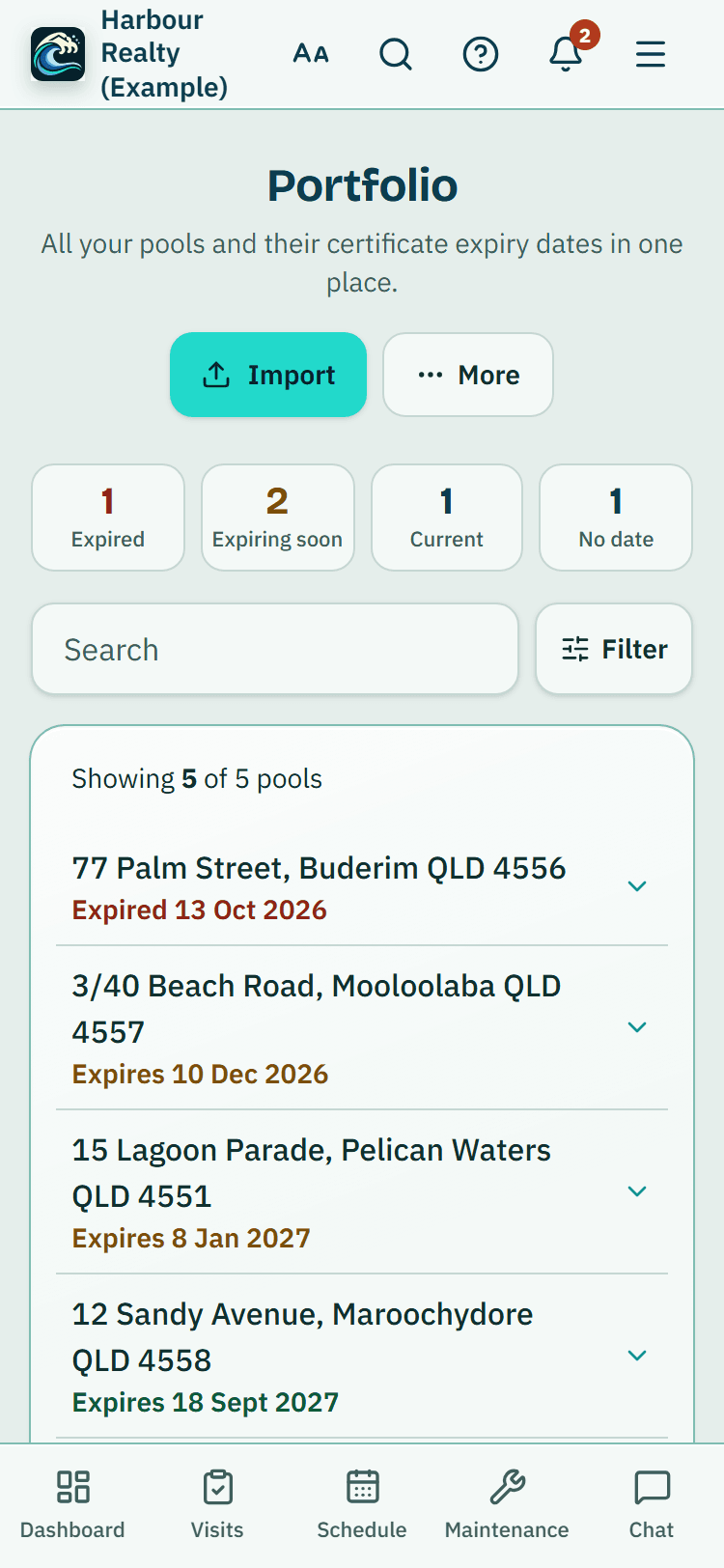
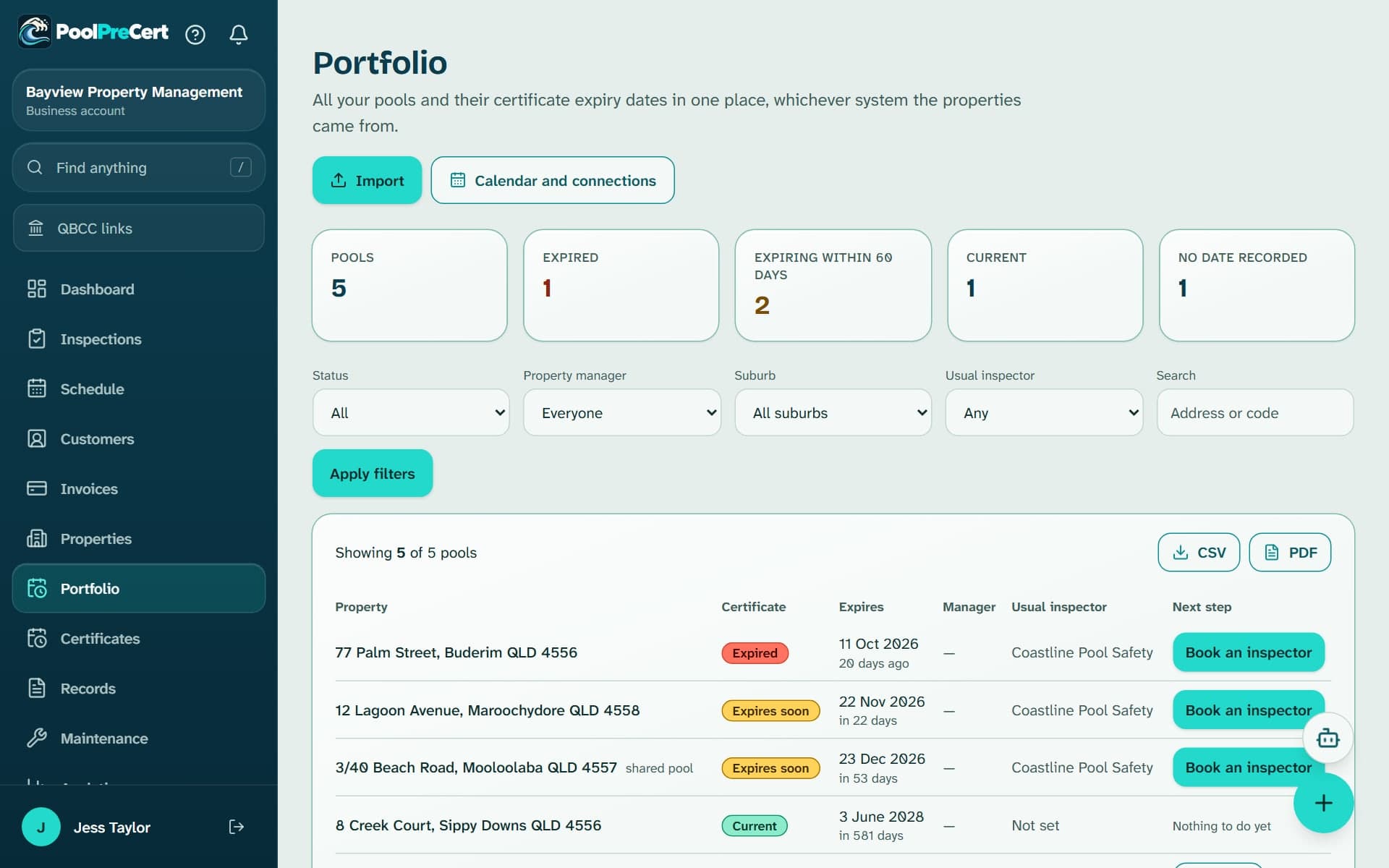
The Portfolio is a pool certificate tracker for your rent roll. It lists every pool with the certificate expiry date you or your import recorded, who manages it and what to do next.
Read more
You filter it, download it and add it to your calendar. PoolPreCert emails a reminder at 60 days, 14 days and on the day.
Pilot offer: the first 20 businesses to sign up get 3 months at no charge (no card needed), then 25% off for as long as you stay a member. 17 of 20 places left. How it works
 Pilot offer: the first 20 businesses to sign up get 3 months at no charge (no card needed), then 25% off for as long as you stay a member. 17 of 20 places left.
The demo is your own private copy with made-up example data. No sign-up, and it's deleted automatically.
Prices include GST.

What you get with Certificate portfolio
A pool certificate tracker for your rent roll
Open Portfolio and you get one row for each pool. A badge says Current, Expires soon, Expired or Not recorded, the Expires column gives the date with the days left or gone, and the last columns show the property manager, the usual inspector and the next step.
Read more
A pool in a unit block is marked as a shared pool. Counts across the top show Pools, Expired, Expiring within 60 days, Current and No date recorded.
Five filters narrow the list, then you press Apply filters (Clear puts everything back):
- Status: Needs attention, Expired, Expires within 60 days, Current or No date recorded.
- Property manager: one person, Everyone, or No manager set.
- Suburb.
- Usual inspector: Any, Has one, or Not set.
- Search: part of an address, or your own property code.
Certificate term, shared or not, and where the dates come from
Dates are what you or your import recorded. On the Certificates page each pool has a card with Record a new certificate (or Add certificate details): date issued, expiry date, certificate number and inspector.
Read more
You can attach the certificate itself to the record, as a PDF or a photo taken on your phone, and the file stays private to your account. Leave the expiry blank and PoolPreCert works it out from the date issued. QBCC says a certificate lasts 2 years for a non-shared pool and 1 year for a shared pool, so mark a pool as shared when it is.
Most agencies start with an upload instead of typing, using the import wizard. A property page also has a QBCC public register panel that shows what QBCC's published open data says, with an as-at date. That data can be out of date, so the official record is always the certificate itself or QBCC's own register.
Reminders at 60 days, 14 days and on the day
Reminder emails go at 60 days, 14 days and on the day the recorded certificate expires. They go to your account's owners and admins.
Read more
If a property has a manager's name and work email, from your import or set on the property, that manager gets the same three emails, once per pool and date.
Each manager email has two buttons that work without signing in and stop working after 45 days: Book an inspector, and I've got a new certificate, where they enter the new date. Sold a property or finished with one? Press Stop reminders for this pool on its card. Nothing is deleted, and Start again turns the emails back on.
Calendar link and downloads
Under Calendar and connections an owner or admin can press Make a calendar link, for the whole agency or for one property manager's pools, and add it to Google Calendar, Outlook or Apple Calendar. Each event shows the property and suburb only, with no owner or tenant names.
Read more
Your calendar app decides how often it refreshes, from every few hours to a day. Anyone holding the link can see the property names, so use Make a new link (the old one stops now) or Stop this link whenever you need to.
The CSV and PDF buttons download the list as filtered on screen: property, status, expiry, days left, manager and next action. They carry no certificate numbers or personal details. An owner can switch downloads off for a team member.
Why the date matters for a letting
QBCC says that for a house or townhouse with a non-shared pool, the lessor must not enter into an accommodation agreement unless a pool safety certificate is in effect.
Read more
A list that shows what is expiring and who manages it gives you time to ask an inspector before a lease starts or renews.





How to start
Add your pools
Press Import on the Portfolio page to upload a spreadsheet export, or add a property and its pool by hand.
Record the dates
For a pool with no date, press Add date on its row, enter the date issued, and press Save certificate.
Name each property's manager
Fill the Property manager and Property manager email columns in your import file, or press Set manager on a row and pick someone on your team, so each manager's reminders reach them.
Filter and download
Choose a status, manager or suburb, press Apply filters, then CSV or PDF.
Make a calendar link
Open Calendar and connections, choose whose properties, press Make a calendar link and follow the steps for your calendar app.
What Certificate portfolio does and does not do
What it does
- Lists each pool you manage with its certificate date
- Reminds you at 60 days, 14 days and on the day
- Filters by status, manager or suburb, with CSV and PDF downloads
- Makes a calendar link
What it does not do
- It does not check a certificate with QBCC live, and it never says a pool has a valid certificate. Only a licensed pool safety inspector issues one.
- It does not book an inspection time. Find an inspector or send a request from a row, then the inspector contacts you.
- It does not read your property software on its own. You upload an export or send properties through the import connection.
- It does not show owner or tenant names in downloads or in the calendar link.
Features that go with it
Property import
Upload a CSV export, check the matched columns, preview what will be added or updated, fix problems in place, then import. Zapier and Make can send properties too.
Preferred inspectors
Keep a list of the inspectors you use, set a default for each property and send a request from the property, the certificate card or the Portfolio. A request is not an inspection.
Smoke alarm dates
Agency accounts keep a smoke alarm date for each rental and email the team before each tenancy or on a chosen date. PoolPreCert reminds you. It does not test or check alarms.
Reports and exports
A branded PDF report with photos and a private link for inspectors, a short summary for agencies, and CSV, PDF, ZIP and accountant exports for everyone.


Guides that give the background
Step by step instructions: Help centre. All features are listed on the features page.
Common questions
How long does a pool safety certificate last in Queensland?
QBCC says 2 years for a non-shared pool and 1 year for a shared pool. Record which kind each pool is, because a shared pool comes round twice as often.
Can I lease a house with a pool if there is no pool safety certificate?
QBCC says that for a house or townhouse with a non-shared pool, the lessor must not enter into an accommodation agreement unless a pool safety certificate is in effect. The Portfolio shows what is expiring so you can ask an inspector in time.
Does PoolPreCert check certificates with QBCC?
No. The dates are what you or your import recorded. A property page can show what QBCC's published open data says, with an as-at date, and that can be out of date. Check the certificate or QBCC's pool register for the official record.
Who gets the reminder emails?
Your account's owners and admins, and the property manager named on each property. Reminders go at 60 days, 14 days and on the day, once for each pool and date.
Can each property manager see only their own pools?
You can filter the Portfolio by manager, and make a calendar link for one manager's properties, so each manager can follow their own list in their calendar.
What does it cost?
An agency account uses the business plans. Starter is $49 a month and Business is $99 a month (incl. GST). The first 20 businesses to sign up get 3 months at no charge (no card needed), then 25% off for as long as you stay a member. After the places are gone, plans start with a 14-day trial, no card required.

What it needs and what it costs
The Portfolio is part of an agency account on a business plan or trial, and your plan sets how many properties you can hold. See the plans and prices. See the plans and prices. The first 20 businesses to sign up get 3 months at no charge, no card required. Prices include GST. Start 3 months at no charge
Try it before you pay
The first 20 businesses to sign up get 3 months at no charge, no card required. Prices include GST. The demo at the top of the page needs no sign-up.
Related help articles
Sources
- QBCC: Inspect and certify a pool (page reviewed 30 Aug 2021; read 6 Nov 2026) (opens in a new tab)
- QBCC: Buy, sell or lease a property with a pool (page reviewed 15 May 2025, published 11 Jun 2026; read 6 Nov 2026) (opens in a new tab)
Last checked against QBCC guidance: 13 November 2026.