

For pool safety inspectors, fence contractors and pool builders
Verified reviews for your pool business, shown on your listing
A verified review comes from a homeowner whose request you marked booked or done in PoolPreCert. It shows on your listing with their stars, their words, their first name and suburb, and the label Verified: booked through PoolPreCert.
Read more
You can reply in public.
Pilot offer: the first 20 businesses to sign up get 3 months at no charge (no card needed), then 25% off for as long as you stay a member. 17 of 20 places left. How it works
 Pilot offer: the first 20 businesses to sign up get 3 months at no charge (no card needed), then 25% off for as long as you stay a member. 17 of 20 places left.
The demo is your own private copy with made-up example data. No sign-up, and it's deleted automatically.
Prices include GST.

What you get with Verified reviews
How a review becomes verified
Only homeowners whose request you marked as booked or done can leave one. That is what makes a review verified. It does not mean PoolPreCert checked your work.
Read more
Each of those homeowners gets one email invitation, and one reminder five days later if they have not reviewed. When you mark a request done, the invitation goes straight away. A request left at booked gets its invitation after about 14 days. The request needs an email address. Without one, the request says No email: can't invite.
Ask customers for a review, and why you cannot remove one
You cannot switch invitations off, choose who is invited, or ask customers how they feel before the email goes. Everyone gets the same invitation, whatever happened. That keeps the reviews honest.
Read more
You cannot edit, hide or remove a review either, and you cannot offer a reward for one. Your answer to a review is a public reply.
What the homeowner writes in a review
They pick 1 to 5 stars and write at least a sentence, up to 1,000 characters. They are asked to leave out phone numbers and addresses. They can edit or delete their own review later.
Read your pool inspector, fence or builder reviews and reply
Owners and admins can read and reply. The reviews show on your listing whether you are a pool safety inspector, a fence contractor or a pool builder.
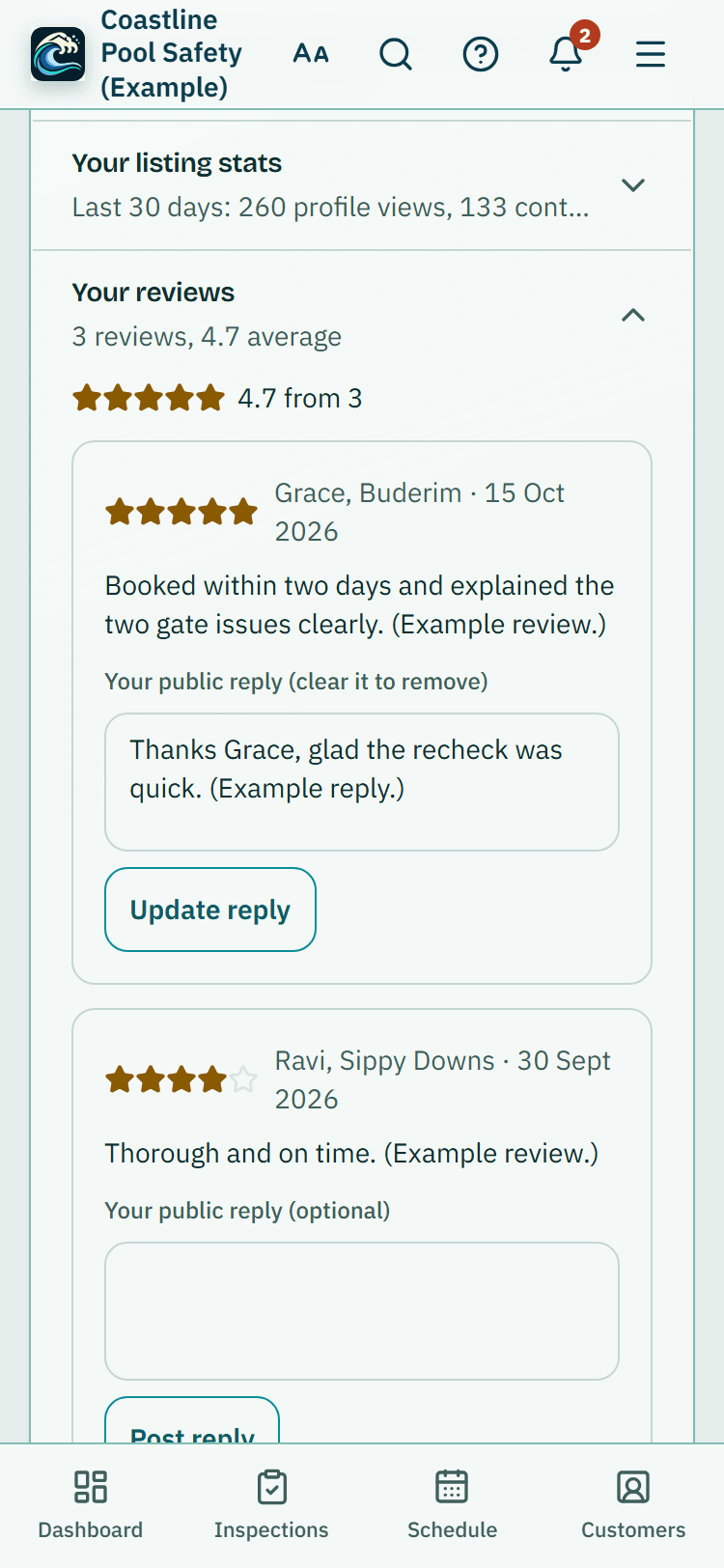
- Inspectors: open Directory listing and look under Your reviews, which shows your average and how many it is from.
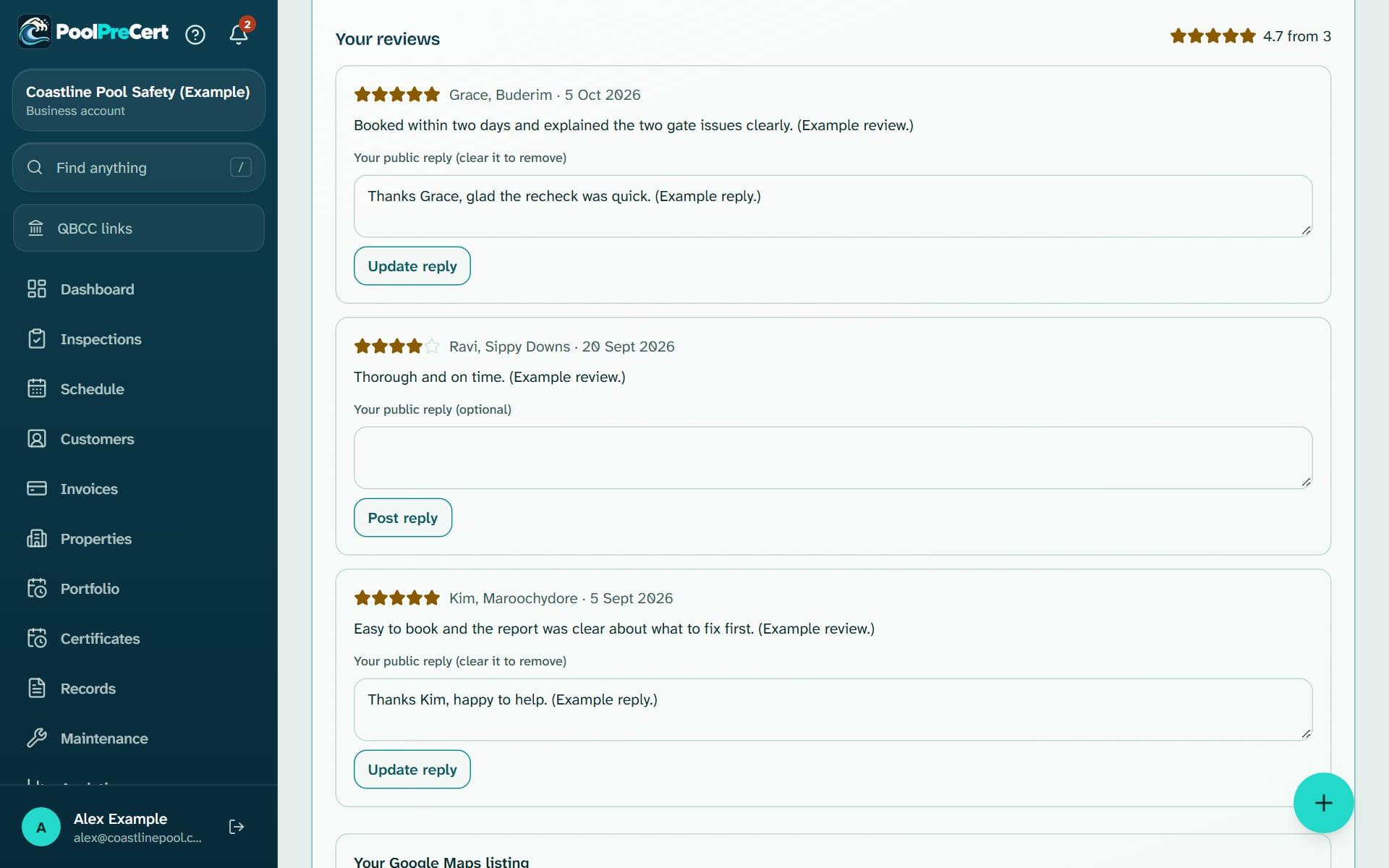
- Fence contractors and builders: open Reviews in the menu.
Read more
- Press Post reply to answer in public, up to 1,000 characters. It shows under the review on your profile. Press Update reply to change it, or clear the box to remove it.
- When a new review is posted, you get a notice in the app and an email to your private request address. They say a review has arrived and send you to it, without the review text.
When PoolPreCert removes a review
Reviews go live straight away and are never removed just because they are negative. PoolPreCert removes or restricts one only if it breaks the rules, such as abuse, personal details, a review not about the job, or signs of manipulation.
Read more
The reason is recorded, and you see it on your list as Removed by PoolPreCert with the reason.
A reviewer whose email domain matches your business's, or a request marked done within minutes of arriving, is flagged for a person to look at. A flag alone does not hide a review. Each review on a profile has a Report a mistake link, and you can email support@poolprecert.com.
How reviews affect your place in the list
Verified reviews count for 35% of the score on a suburb page and 60% on a council page. With no reviews a listing scores neutral, and a few reviews move it only a little.
Read more
A Google rating you link from Maps shows beside your reviews but is not part of the score. Reviews on one listing are never shown on another.




How to start
Finish the job in Requests
Open the request in Requests. Inspectors press Mark booked or Mark inspection done. Fence contractors and builders press Mark booked or Mark done.
Check the invitation badge
The badge on the request says if the invitation is not sent yet, sent, or the homeowner has reviewed.
Read the review
Inspectors open Directory listing and scroll to Your reviews. Others open Reviews.
Reply in public
Type your answer in the reply box and press Post reply. Keep it polite and leave out private details.
What Verified reviews does and does not do
What it does
- Invites a review once you mark a request booked or done
- Shows verified reviews on your listing with the homeowner's first name and suburb
- Lets you reply in public
What it does not do
- It does not let you write, buy, edit, hide or remove a review.
- It does not let you offer a reward for a review. The invitation never mentions one, and any incentive must not depend on the outcome.
- It does not copy in Google reviews. If you link your Google Maps listing, its rating shows separately.
- It does not promise that a customer will respond. Some never do.

Features that go with it
Requests inbox
Requests from your directory listing, self-checks and Website button arrive in one inbox, with the homeowner's details, message and status steps.
Directory listing
Your QBCC licence probably has a listing already. Claim it, add your details and areas, and homeowners can find you, call you and send requests.
Boost your profile
Show your listing in a labelled Sponsored space above the list on council and suburb pages you choose. One fixed price an area, no bidding, no promised results.



Guides that give the background
Step by step instructions: Help centre. All features are listed on the features page.
Common questions
How is a review verified?
The review is tied to a request you marked booked or done through PoolPreCert, and each of those homeowners gets an invitation. It does not mean PoolPreCert checked the work.
Can I delete or hide a bad review?
No. You cannot edit, hide or remove a review. Reply in public with the facts. If it breaks the rules, use the Report a mistake link on the review or email support@poolprecert.com. Negative reviews are not removed just for being negative.
Can I ask past customers for a review?
Only through PoolPreCert requests that you mark booked or done. The invitations come from PoolPreCert to everyone the same way.
Can I offer a discount for a review?
No. You must not buy, manufacture, suppress or manipulate reviews, and any incentive must not depend on the outcome and must be disclosed where the law requires.
A customer has not been invited. Why?
Check the badge on the request. The request may have no email address, it may still be marked new or contacted, or you marked it booked and the invitation goes after about 14 days. Marking it done sends the invitation straight away.
Does my Google rating count?
A Google rating you link from Maps shows beside your reviews but is not part of the score. PoolPreCert does not copy in Google reviews.

What it needs and what it costs
Reviews need a claimed listing and a plan or trial that includes requests, because a review follows a request. The reviews themselves carry no extra charge. See the plans and prices. The first 20 businesses to sign up get 3 months at no charge, no card required. Prices include GST. Start 3 months at no charge
Try it before you pay
The first 20 businesses to sign up get 3 months at no charge, no card required. Prices include GST. The demo at the top of the page needs no sign-up.