

For pool safety inspectors, fence contractors and pool builders
Pool check button, link and QR code: put the self-check on your own website
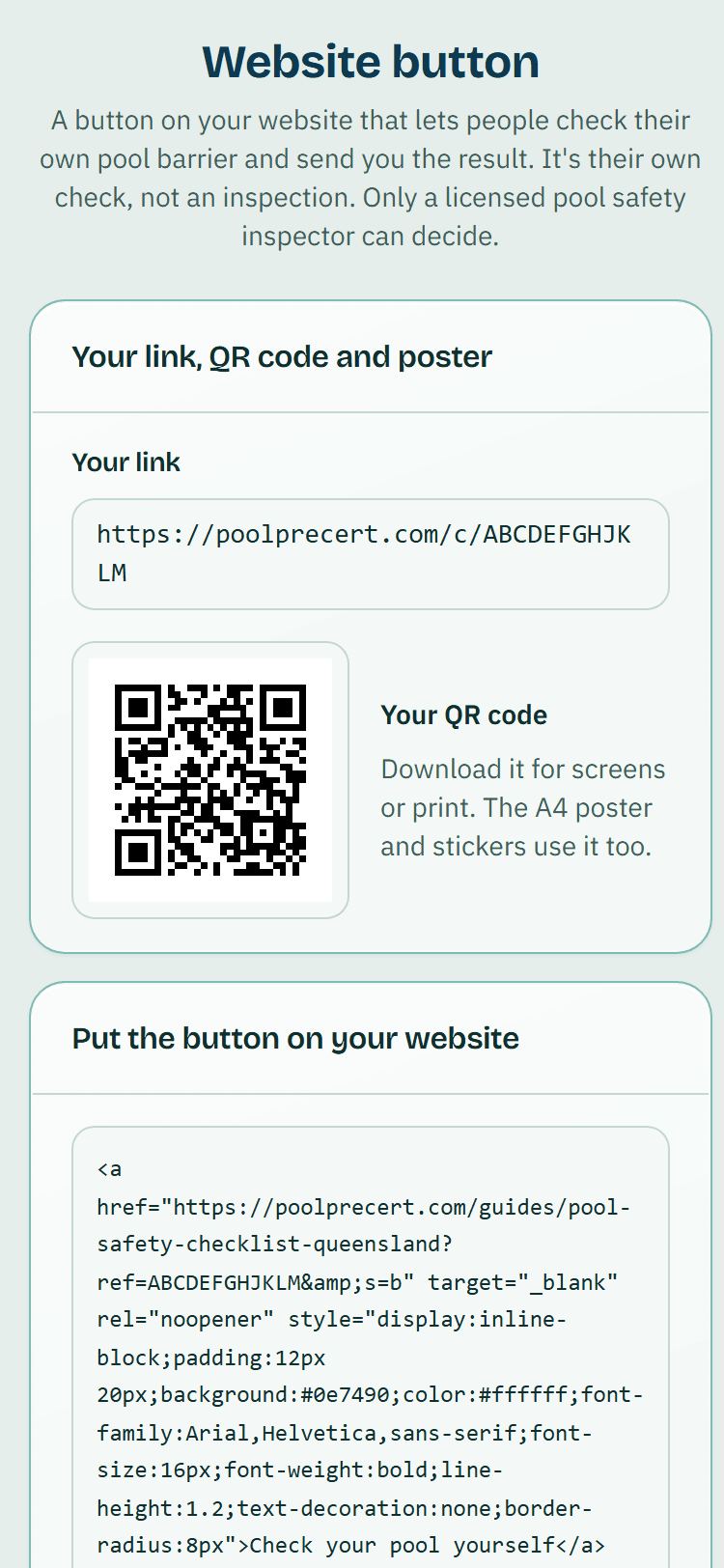
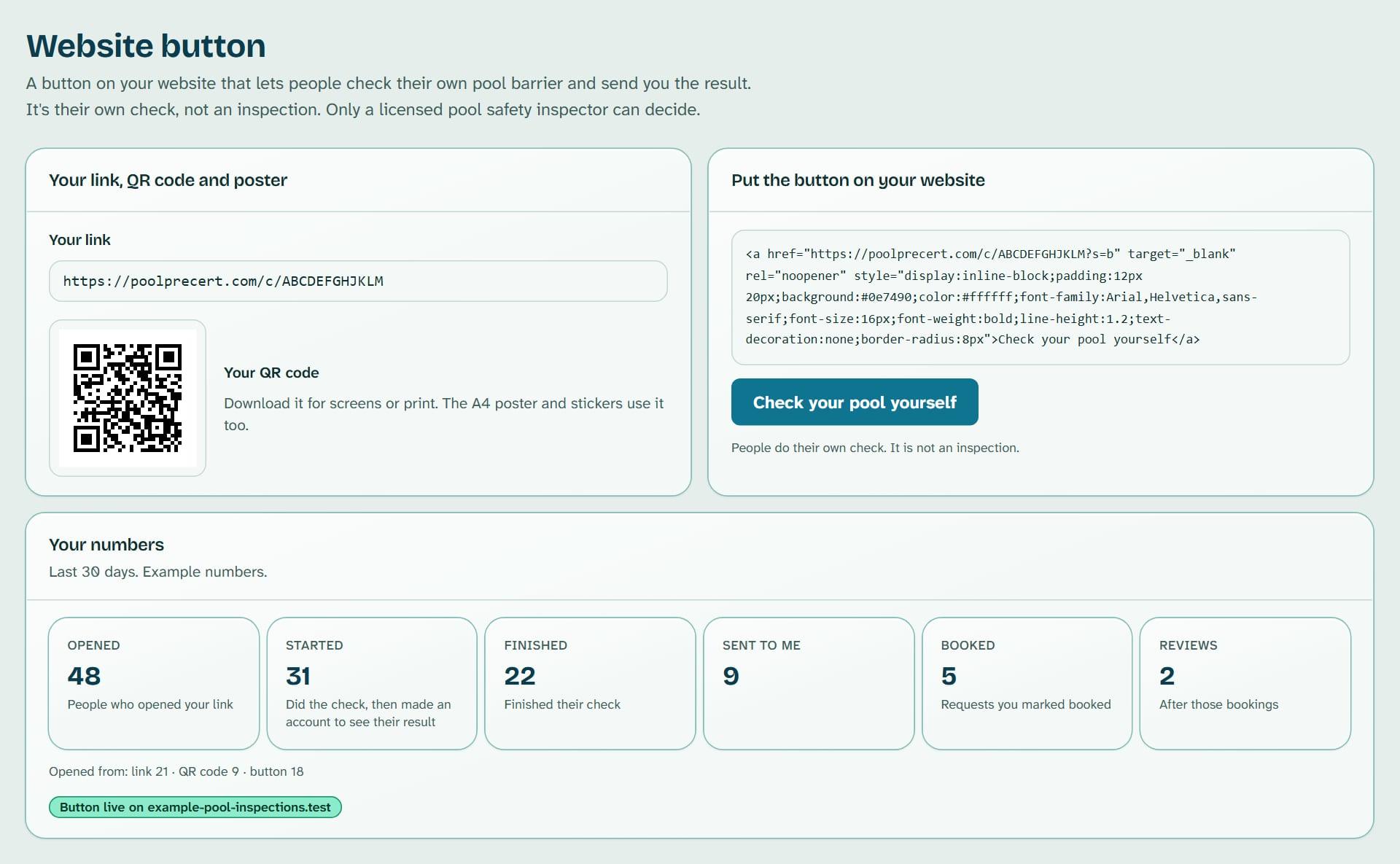
The Website button gives you a pool check button to paste on your website, plus a link, a QR code, a poster and stickers.
Read more
A visitor does their own pool self-check, makes an account to see the result, and can choose to send it to you as a request. It is their own check, not an inspection.
Pilot offer: the first 20 businesses to sign up get 3 months at no charge (no card needed), then 25% off for as long as you stay a member. 17 of 20 places left. How it works
 Pilot offer: the first 20 businesses to sign up get 3 months at no charge (no card needed), then 25% off for as long as you stay a member. 17 of 20 places left.
The demo is your own private copy with made-up example data. No sign-up, and it's deleted automatically.
Prices include GST.
What you get with Website button
A pool check button for your website, plus a link and QR code
You do not need to touch any code to use most of it.
- A simple button: a plain link styled as a button. It has no script and works on almost any website.
- An optional pop-up version with one script line we host. It opens the check in a small window on a computer and a new tab on a phone.
- Your link, to paste into Facebook, Instagram, an email signature or anywhere else you can paste a link.
Read more
- A QR code to download as a PNG for screens or an SVG for print.
- An A4 poster and a sheet of six small stickers, as PDFs, plus a one-page set-up guide.
If your website builder blocks the button
Where a site blocks scripts, the pop-up version still works as a normal link. Short guides for WordPress, Wix, Squarespace, GoDaddy, Weebly and Shopify are on the page, along with a ready-made message to email your web person.
What your customers do when they check their own pool
The link opens a plain page that names your business and licence number from your claimed listing. The visitor does the self-check, makes an account to see the result, and chooses whether to send it to you. If they do, it arrives in your Requests inbox like any other request.
Read more
On their finish screen your business is shown first, marked as the business whose website they came from, with the usual list of nearby licensed businesses underneath. Only people who came from your link see you first.
The wording is fixed
You choose one of four approved button texts, such as Check your pool yourself or Check your pool, then send it to us, and one of six ready colours. Choose Match my site to type your own colour.
Read more
We pick black or white text and refuse a colour that is hard to read. You cannot write your own button text.
Describe the check as the homeowner's own check. Do not say or suggest a pool meets the standard or will be accepted at an inspection, and do not say QBCC, the Queensland Government or PoolPreCert has approved you. Inspectors reply only to arrange a booking and give no view on the pool before attending. Fence contractors and builders reply only to offer a quote or talk about the work. The full rules are in clause 11B of the Terms of Service.
Test it and read your numbers
Save up to five website addresses so we can show where visits come from. Press Check my page to have us look at one page once. We change nothing and keep nothing from the page. If we see your link, you are live.
Read more
Your numbers show Opened, Started, Finished, Sent to me, Booked and Reviews over the last 7, 30 or 90 days, and whether opens came from the link, the QR code, the button or the pop-up. These are counts only. If your link opens from a site not on your list, the page asks if it is yours.
Who can use it, and pausing
It is for owners and admins of inspector, fence contractor and pool builder accounts. You need a claimed listing, requests switched on and a plan or trial that includes requests. If one is missing, the page shows a single card saying which, with a button to fix it.
Read more
Press Pause my button and people who open your link still do their own check, but your business is not shown to them. Opens are still counted. Press Turn back on when you are ready.


How to start
Set it up
Open Website button in the menu and press Set up my Website button. Your link is made from your claimed listing.
Pick your button
Choose a button text and a colour, then press Save my button.
Share the link
Press Copy link and paste it into Facebook, email or a text. Download the QR code, poster or stickers to print.
Add it to your website
Press Copy button code and paste it where you want it, or press Copy the message to send it to your web person.
Check it works
Type your website address, then press Check my page under Test it.
What Website button does and does not do
What it does
- Gives you a pool check button to paste on your website
- Makes a link, QR code, poster and stickers
- Lets a visitor do their own check and choose whether to send you the result
- Shows how many people opened it and sent a result, without names
What it does not do
- It does not make the check an inspection, and it does not give or replace a pool safety certificate.
- It does not promise any visits, requests or bookings, and it does not show you who looked. You see names only if a person chooses to send you a request.
- It does not let you change the button words or hide the notice on the page that the check is not an inspection.
- It does not accept a Facebook or Google address as your website. For those, use your link.

Features that go with it
Requests inbox
Requests from your directory listing, self-checks and Website button arrive in one inbox, with the homeowner's details, message and status steps.
Directory listing
Your QBCC licence probably has a listing already. Claim it, add your details and areas, and homeowners can find you, call you and send requests.
Social media posts
Ready-made pictures and captions for Facebook, Instagram and Google Business Profile, filled in with your details. You change the words and post them yourself.
Verified reviews
Homeowners whose request you marked booked or done get one invitation to review you. Reviews show on your listing and you can reply in public.




Guides that give the background
Step by step instructions: Help centre. All features are listed on the features page.
Common questions
Do I need a website or a web developer?
No. The link and QR code work on Facebook, in email signatures, on posters and on stickers, and you do not need to touch any code for them. To add the button to a site, paste the code yourself or press Copy the message to send it to your web person.
Does it work on Wix or GoDaddy?
The link and QR code do. Some builders put pasted code in a box of their own or block scripts, and Wix and GoDaddy do this. The link still works, so the simple button is the safer choice there.
What does my customer see, and is it an inspection?
The link opens a plain page that names your business and licence number. They do their own self-check, make an account to see the result, and choose whether to send it to you. It is their own check, not an inspection.
Does it cost extra?
No. It is part of the plans that include requests: Starter is $49 a month and Business is $99 a month (incl. GST). The first 20 businesses to sign up get 3 months at no charge (no card needed), then 25% off for as long as you stay a member. After the places are gone, plans start with a 14-day trial, no card required.
Can I use it on more than one site?
Yes. Add up to five website addresses and one link works on all of them, so we can show you where visits come from.
What should I say when someone sends me a result?
Inspectors reply to arrange a booking and give no view on the pool until they have attended. Fence contractors and builders reply to offer a quote or talk about the work. Only a licensed pool safety inspector decides about a pool.

What it needs and what it costs
The Website button is included in the plans and trials that include requests, with no separate charge. It also needs a claimed listing and requests switched on. See the plans and prices. The first 20 businesses to sign up get 3 months at no charge, no card required. Prices include GST. Start 3 months at no charge
Try it before you pay
The first 20 businesses to sign up get 3 months at no charge, no card required. Prices include GST. The demo at the top of the page needs no sign-up.