

For pool safety inspectors, fence contractors and pool builders
Pool safety certificate numbers by suburb: see where the work is (Insights)
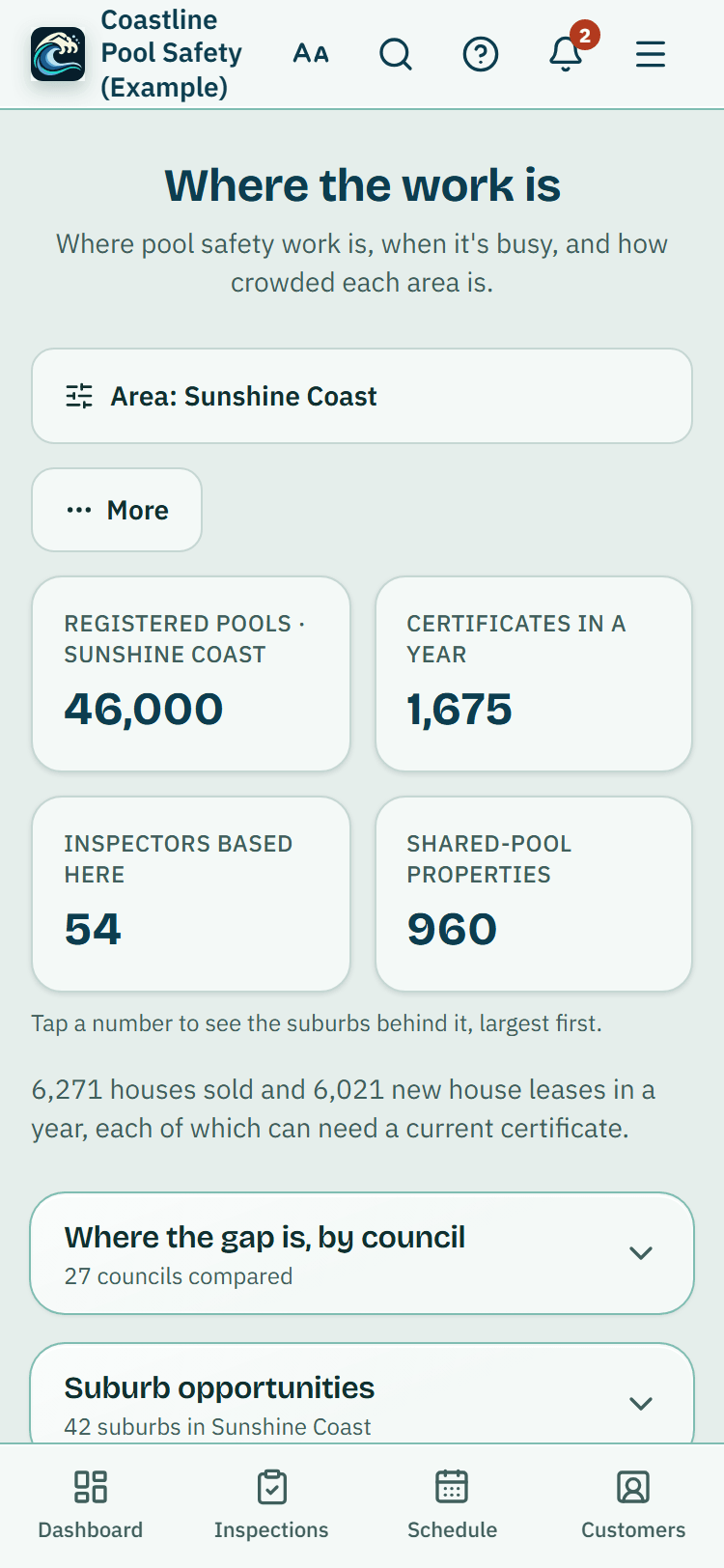
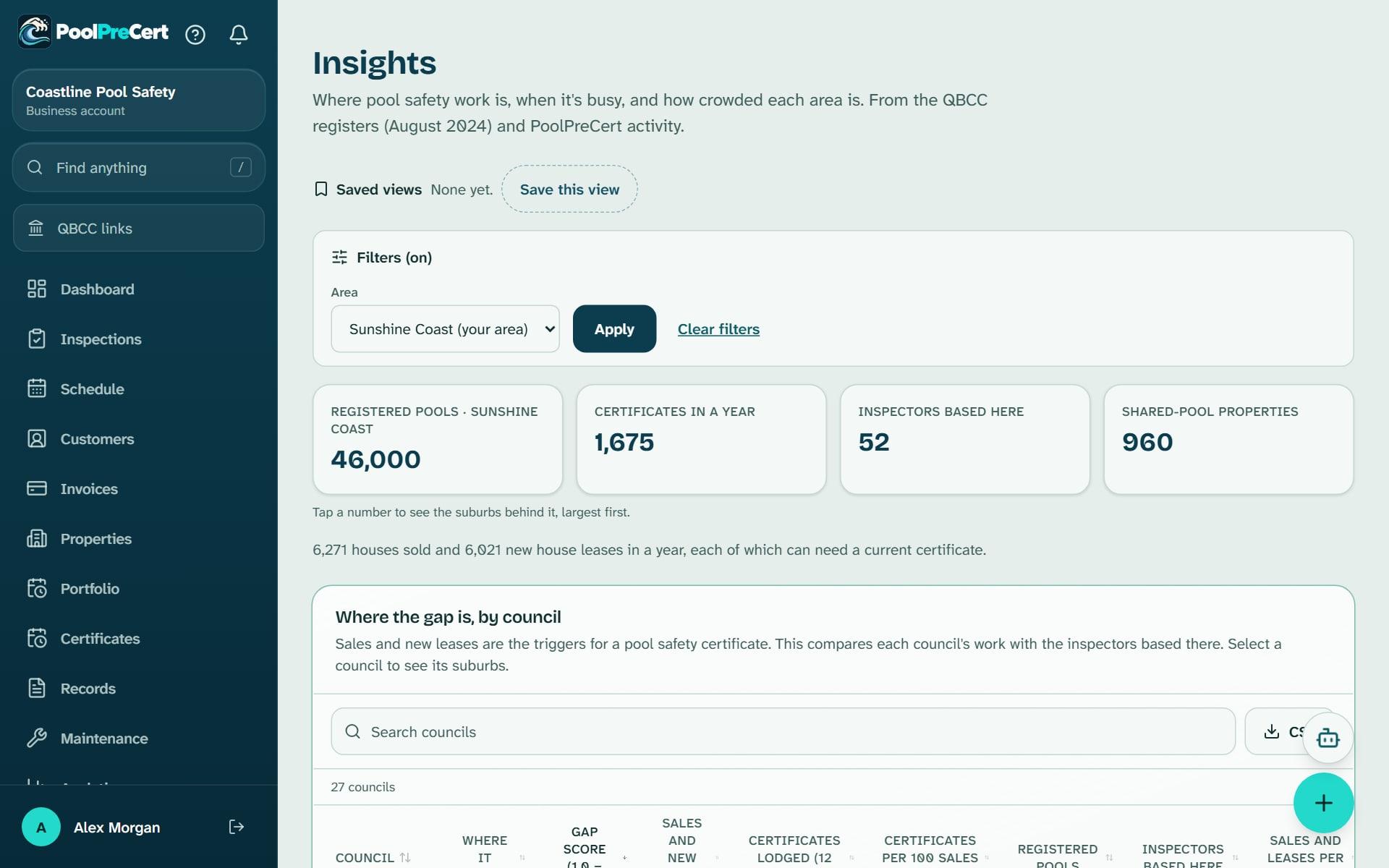
Insights, called Where the work is in an inspector's menu, shows inspectors where pool safety work is: registered pools, certificates in a year and inspectors nearby, by council and suburb, from QBCC's public register.
Read more
Fence contractors and pool builders see how homeowners find and contact their listing. The register figures are old, and every one shows its date.
Pilot offer: the first 20 businesses to sign up get 3 months at no charge (no card needed), then 25% off for as long as you stay a member. 17 of 20 places left. How it works
 Pilot offer: the first 20 businesses to sign up get 3 months at no charge (no card needed), then 25% off for as long as you stay a member. 17 of 20 places left.
The demo is your own private copy with made-up example data. No sign-up, and it's deleted automatically.
Prices include GST.
What you get with Insights
Pool and certificate numbers by council area and suburb
For inspectors, Where the work is answers how many pools there are in a council area or suburb, using QBCC data as at August 2024. Pick an Area (your own councils are marked) and it shows four numbers: Registered pools, Certificates in a year, Inspectors based here and Shared-pool properties.
Read more
Councils are ranked against each other, and the Suburb opportunities table lists each suburb with its pools, certificates a year, the trend on the year before, inspectors within 40 km and certificates per inspector.
A plain label says where each suburb stands, such as Few inspectors for the demand. That means fewer inspectors than most places, not none. Sales and leases are known only for whole councils, so suburbs are ranked on certificates lodged rather than a guessed suburb figure.
How old the QBCC pool register data is
The pool, certificate and inspector figures are QBCC pool register data, taken from its public pool safety register, an extract current as at August 2024. That file listed 451,973 registered pools at 448,470 properties and 467 licensed pool safety inspectors with Queensland business addresses.
Read more
When we last checked, on 9 October 2026, QBCC had not published a newer extract.
So treat the numbers as a guide to where work has been, not a live count. The file shows when a certificate was recorded but not whether it is still current, and QBCC keeps only each property's latest certificate, so older months read lower than they really were. Each figure on the screen carries its source and its as-at date.
Busiest months, certificates expiring soon and the full version
Every business account sees a preview: the council summary, the busiest months for pool certificates statewide, the top 5 suburbs and your own expiry outlook, which counts pools whose certificates you recorded that expire in 30, 60 and 90 days, with a Book link.
Read more
Full Insights adds every suburb with sorting, search and a CSV download, the monthly pattern for any council, activity by suburb and the items homeowners most often need to fix. Your own inspections and defects are on a separate page, My numbers.
- Activity by suburb: completed homeowner self-checks and inspection requests for any date range, with a comparison against the period before.
- Counts are shown only where there are at least 5, and no individual homeowner is ever shown.
For fence contractors and pool builders: your own listing numbers
Your Insights is about your own directory listing, not the QBCC pool register. You see Profile views, Phone taps, Quote requests, Answered, Booked or done, Typical time to answer and New reviews for any date range, with a comparison to the period before.
Read more
Tap a number to see the days or requests behind it, filter by request status or service, and download a CSV.
These are counts only and no visitor details are kept. Insights appears once your listing is claimed and confirmed.



How to start
Open the page
Choose Where the work is in the app menu (under More for an inspector). Fence contractors and pool builders choose Insights.
Pick an area and dates
Choose an Area, then a range of 7, 30 or 90 days, this year or your own dates. Turn on compare to see the period before.
Read the suburb table
Sort by certificates per inspector or by trend, or tap a number at the top to see the suburbs behind it.
Check the dates
Read the as-at date under each table before you rely on a figure.
Download what you need
On the full version, use the download button on a table to save it as a CSV.
What Insights does and does not do
What it does
- Shows pool and certificate numbers by council area and suburb
- Says how old the QBCC register data is under each table
- Lets you sort suburbs, and download a table as CSV on the full version
- Shows fence contractors and pool builders their own listing numbers
What it does not do
- It does not show names, addresses or contact details from the QBCC register, and it never names a homeowner.
- It is not a live feed. The register figures are an extract current as at August 2024.
- It does not predict how many jobs you will win, and it does not tell you how much to charge.
- It does not show which certificates are still current. The expiry outlook only uses certificates you recorded.

Features that go with it
Directory listing
Your QBCC licence probably has a listing already. Claim it, add your details and areas, and homeowners can find you, call you and send requests.
Boost your profile
Show your listing in a labelled Sponsored space above the list on council and suburb pages you choose. One fixed price an area, no bidding, no promised results.
Social media posts
Ready-made pictures and captions for Facebook, Instagram and Google Business Profile, filled in with your details. You change the words and post them yourself.


Guides that give the background
Step by step instructions: Help centre. All features are listed on the features page.
Common questions
Which plan gets full Insights?
Business gets full Insights, and so does a trial. Starter shows a preview. Starter is $49 a month and Business is $99 a month (incl. GST).
Where does the data come from, and how old is it?
From QBCC's pool safety register, published as open data under a Creative Commons licence, and for sales and leases from the Queensland Government Statistician's Office and the Residential Tenancies Authority. The register extract is dated August 2024, and the as-at date shows beside each figure.
Is it a live feed?
No. The register figures are an extract current as at August 2024. Older months also read lower than they really were, because QBCC keeps only each property's latest certificate and an older one drops out when a newer one is recorded.
How many pools are there in Queensland?
The QBCC register extract, current as at August 2024, listed 451,973 registered pools at 448,470 properties. Insights uses that QBCC source only and shows the date, so treat it as a past figure, not today's count.
Why are some numbers hidden?
Activity is counted per area and hidden below 5, so no household can be picked out. An area appears once it has at least 5 checks or requests in the period.
Can I see which inspectors work in a suburb?
You see how many are within 40 km of each suburb and how many are based in each council, as a count. Names are on the public directory, not in Insights.

What it needs and what it costs
Full Insights is on the Business plan and the trial, the Starter plan shows a preview, and fence contractor and pool builder Insights needs a claimed and confirmed listing. See the plans and prices. The first 20 businesses to sign up get 3 months at no charge, no card required. Prices include GST. Start 3 months at no charge
Try it before you pay
The first 20 businesses to sign up get 3 months at no charge, no card required. Prices include GST. The demo at the top of the page needs no sign-up.
Related help articles
Sources
- QBCC pool safety register (Queensland Government open data, as at August 2024) (opens in a new tab)
- Queensland Government Statistician's Office (opens in a new tab)
- Residential Tenancies Authority (opens in a new tab)
Last checked against QBCC guidance: 12 November 2026.