


Team chat
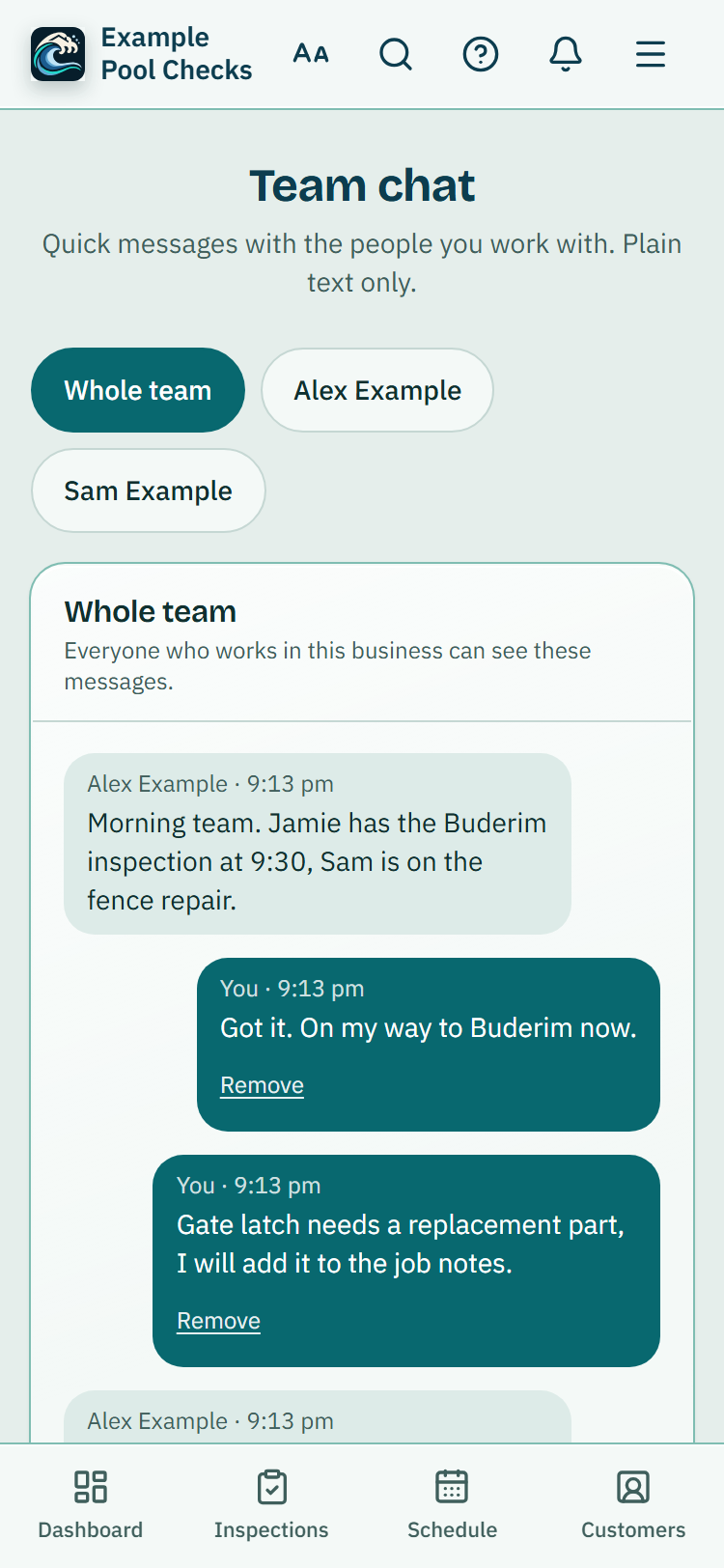
Send quick text messages to everyone in your business or to one person, see what you have not read yet, and remove a message you sent.
For: Pool safety inspectors, Pool fence contractors, Pool builders, Property managers and agencies · Last updated 21 November 2026
What it is
Team chat is a simple message board for the people who work in your business. There is one room for the whole team, and you can also write to one person on their own. It is text only.
Who it is for
Owners, administrators and inspectors in a business with more than one person. A person with the Viewer role does not see it.
How to do it
Open Team chat from the menu (under More on some screens) or from Settings.
The Whole team room opens first. Everyone in your business can read it.
To write to one person, tap their name above the messages.
Only the two of you can see those messages, not even the owner.
Type your message and press Send.
Messages can be up to 2000 characters. The newest message is at the bottom.
To take a message back, press Remove under it and confirm.
It then shows as Message removed for everyone. Staff can remove their own messages. Owners and administrators can remove any message in a room they can see.
Good to know: A private message can only be read by the two people in it.
Switching Team chat off
The owner can switch Team chat off for the whole business under Settings, Team tools, and back on later. The messages are kept.
Unread messages and notices
A number on the Team chat menu link and on the person's name shows how many messages you have not read. Opening the room reads them.
Read more
You also get one notice in the bell for a run of messages, not one for every message. Settings, then Notifications, has a Team chat row to turn the notice off. Owners and administrators can also get one email if a message is still unread after about 15 minutes.
The email says how many messages are waiting but does not repeat what they say.
What stays private
Messages are plain text. Links in a message open in a new tab when someone taps them. Messages are kept until someone removes them.
What it does not do
- It does not send photos or files, and it does not message your customers. For customers, use the email and text features.
- It does not show who has read a message, and it does not tell you someone is typing.
- It does not replace a phone call for anything urgent on site.
Common questions
Why can't I see Team chat?
It only shows when your business has more than one person who can chat, and not for the Viewer role. Ask your owner to check your role under Team.
Can the owner read direct messages?
No. A direct message is seen only by the two people in it.
PoolPreCert helps you do and record your work. It does not decide whether a pool meets the Queensland standard. Only a licensed pool safety inspector does that.
Related articles
Team members and what each role can do
Invite people by email, choose owner, admin, inspector or viewer, switch between businesses and see what each role can do.
Roster and time off for your team
See who works which days, ask for time off, and approve or decline it. A job booked on someone's approved leave shows a warning.

Was this helpful?
YesNo, tell us what was missing
This opens an email to the PoolPreCert team. Please do not include passwords or personal details.
Still stuck? Contact support
Email support@poolprecert.com and tell us what you were trying to do and which screen you were on. Please do not send passwords or card numbers. The PoolPreCert team will reply.