


Quotes and invoices for property managers
How a property manager makes a quote or invoice for an owner or contact, sets up Invoicing, emails the PDF, sends a payment reminder and marks it paid.
For: Property managers and agencies · Last updated 23 November 2026
What it is
Use quotes and invoices for work you arrange for an owner or contact, such as a fix after a routine check.
Read more
PoolPreCert numbers each one, works out the GST if you are registered, makes a PDF and can email it. You tell it when the owner or contact has paid.
Who it is for
Agencies and property managers. Owners, admins and staff can create them; viewers can look. An owner or admin does the one-off Invoicing settings.
How to do it
Open Settings, then Invoicing, and answer Are you registered for GST?
Yes or No.
Add the bank account owners and contacts pay into: account name, BSB and account number.
It is printed on invoices only. Your ABN goes under Business and branding. Choose Days to pay, then press Save.
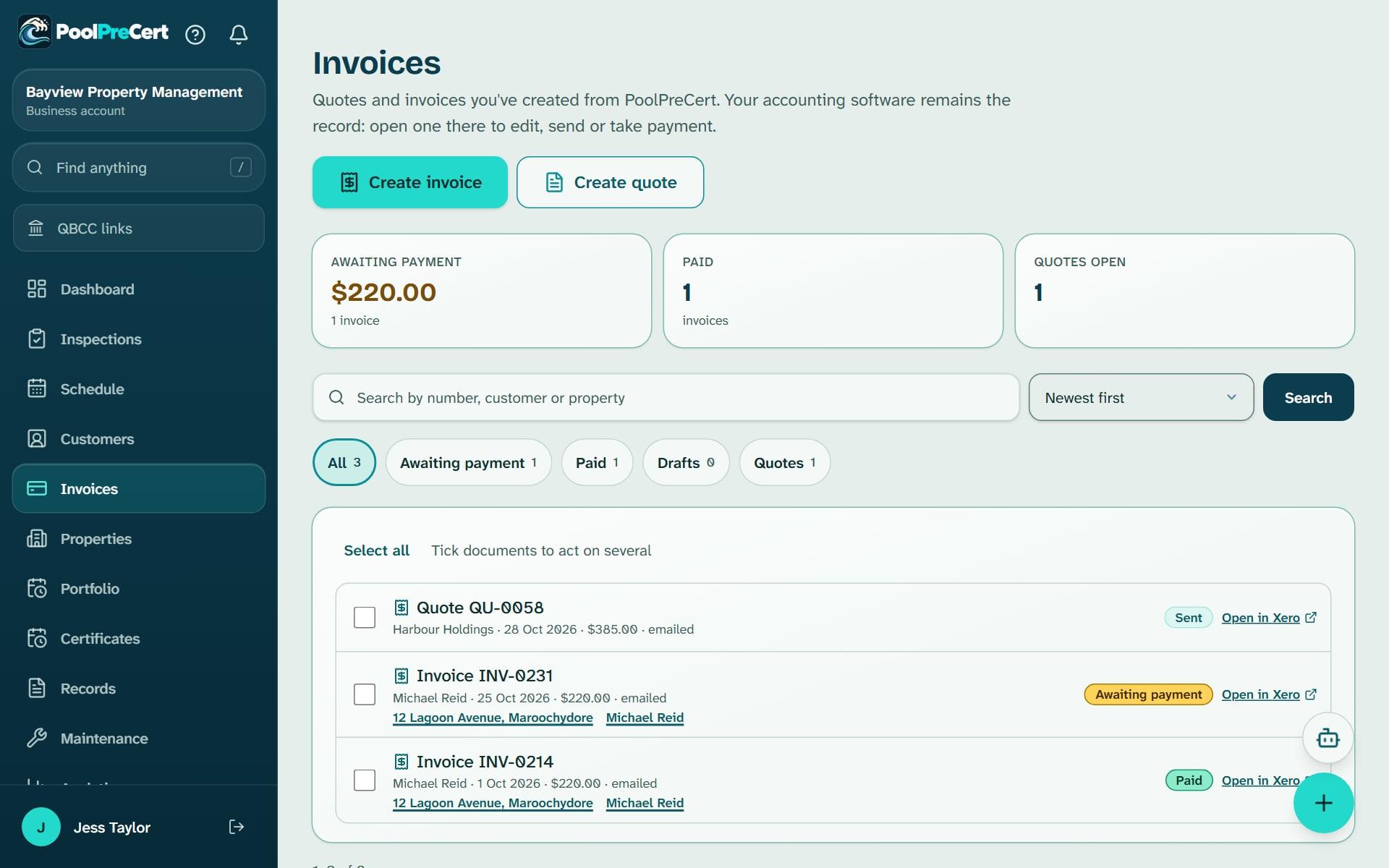
Open Invoices and press Create invoice or Create quote.
You can also open an owner's page and choose it under More.
Choose the owner or contact.
If they are not in your list yet, add them on the same page. Choose the property if it is for one, then write what the work is and the price, or use Add a saved item.
Tick Email it to the owner or contact now to send the PDF straight away, or leave it unticked and send it from its own page.
Their email address is needed to send it.
On the next page you can press See the PDF, Email it, or come back to it later from Invoices.
Tap anywhere on a row in Invoices to open it.
Show the other 2 steps
An invoice you emailed that is still unpaid has Send a payment reminder.
Invoices also has an Invoice reminders box for every unpaid invoice, with a Remind button each and an automatic option.
When the money reaches your bank, open the invoice and press Mark as paid.
For a quote, press Accepted or Declined when the owner or contact answers.
Tip: An unpaid invoice you emailed has Send a payment reminder, and the Invoice reminders box on Invoices lists every unpaid one.
Sending the report on the same email
If a quote or invoice is linked to a routine check that has a report, you can send the report on the same email under Files to send with it. Settings, Invoicing sets whether Self-check report (PDF) starts ticked. A routine check report is a record of what you found. It is not a certificate.
If you use Xero
Under Settings, Integrations you can connect Xero. Quotes and invoices are then made in your own Xero file and listed on the Invoices page, and Xero works out the GST.
Prices and GST
Every price is the amount the owner or contact pays. If you are registered for GST, the PDF is headed Tax invoice and shows the GST included, one eleventh of the total. If you are not, it shows no GST. PoolPreCert records the answer you give and does not give tax advice.
What it does not do
- PoolPreCert does not take payments. Owners and contacts pay you directly, by bank transfer to the account on the invoice.
- Nothing is emailed unless you tick Email it or press Email it. Nothing is emailed from the demo.
PoolPreCert helps you do and record your work. It does not decide whether a pool meets the Queensland standard. Only a licensed pool safety inspector does that.
Related articles
Owners and contacts for property managers
How a property manager keeps owners, landlords and other contacts with their rentals: add and find them, notes and tags, and each rental's certificate date.
Record a property visit
How a property manager records a visit to a rental: the date, who went, notes and photos, and where visits show afterwards, Records included. Not an inspection.
Booking requests, texts and exports for property managers
How a property manager deals with booking requests, switches on texts to owners and contacts, and downloads reports and a copy of the business data.


Was this helpful?
YesNo, tell us what was missing
This opens an email to the PoolPreCert team. Please do not include passwords or personal details.
Still stuck? Contact support
Email support@poolprecert.com and tell us what you were trying to do and which screen you were on. Please do not send passwords or card numbers. The PoolPreCert team will reply.