


Hours and roster for property managers
How a property manager sets working hours and days off for the Schedule, a calendar link for your phone, and how staff ask for time off on the roster.
For: Property managers and agencies · Last updated 23 November 2026
What it is
Hours and days off tells the Schedule when your team works, so it can warn you about a visit booked outside those times. Roster and leave shows each person's week and their time off.
Who it is for
Everyone sets their own hours. Owners and admins set anyone's and decide time off. Viewers don't have the roster.
How to do it
Open Schedule, then Hours and days off.
Under Working hours choose the working days and the start and finish times, then save.
Under Team hours and days off a person can have their own hours.
Add holidays and leave under Days off.
Set the travel time you need between visits.
It is the gap left when you change the order of a day.
Under Calendar link, make a private link to see your booked visits in Google, Outlook or Apple Calendar.
Keep it private: anyone with it can read your schedule until you stop it.
To ask for time off, open Roster and leave, choose the first and last day, add a note if you like, and press Ask for time off.
Owners and admins see it under Time off waiting for you and press Approve or Decline.
Good to know: A visit booked on someone's approved time off only shows a warning. You can move it or leave it.
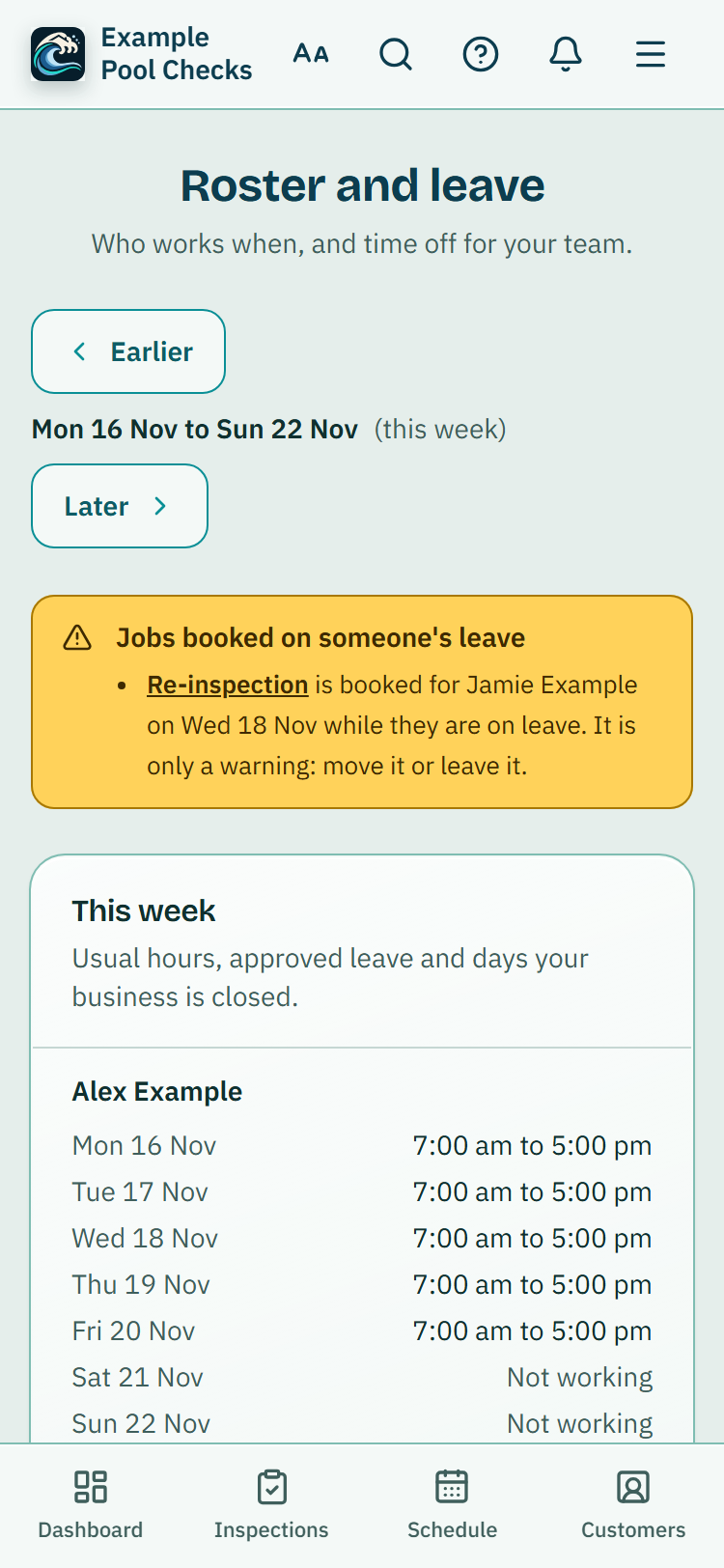
Visits on someone's leave
When a visit is booked for someone on approved time off, the roster, the visit and the Schedule show a warning. It never stops you booking: move the visit, give it to someone else or leave it.
What it does not do
- Working outside your hours is still allowed. The Schedule warns and never blocks.
- The roster does not count leave balances or work out pay.
PoolPreCert helps you do and record your work. It does not decide whether a pool meets the Queensland standard. Only a licensed pool safety inspector does that.
Related articles
Schedule for property managers
How a property manager books property visits on the Schedule, keeps visits with no time yet, moves them, tells the owner or contact and records the visit on the day.
Clock on for property managers
How property managers clock on and off, take breaks, put their time against a visit, and how an owner or admin checks and approves the team's weekly timesheets.
Was this helpful?
YesNo, tell us what was missing
This opens an email to the PoolPreCert team. Please do not include passwords or personal details.
Still stuck? Contact support
Email support@poolprecert.com and tell us what you were trying to do and which screen you were on. Please do not send passwords or card numbers. The PoolPreCert team will reply.