

Record keeping for pool safety inspectors
What the May 2026 QBCC fact sheet asks inspectors to record and keep: dated notes, photos and video, a checklist of every requirement, kept 5 years.
QBCC's record keeping fact sheet (effective May 2026) says that when inspecting or reinspecting a regulated pool an inspector must keep records that are clear, legible and objective, that support the decision to issue a certificate or nonconformity notice, that show how the standard was assessed, and that are kept for at least 5 years. It lists photographs and videos, time and date stamped, contemporaneous notes, reports, and diagrams as acceptable evidence.Source: QBCC fact sheet, Record keeping for pool safety inspectors (effective May 2026), read 5 Nov 2026. The fact sheet is two pages and has no review date other than its effective month.
There is no charge to claim a listing.
What a record should show
The fact sheet says inspection records should clearly show:
- The pool: its location and type.
- The barrier layout, including fences, gates and buildings.
- Evidence that the barrier does or does not meet the standard, and any damaged sections.
- The CPR sign and where it is.
- Latches, hinges, fence intersections and climbable features.
- Measurements, clearly identified: heights, gaps and climbable objects.
- Any special considerations, and the details of decisions and advice given.
It also says records must be enough for a third party to assess whether the pool meets the standard.
What counts as evidence
QBCC says adequate records must include a combination of photographs (time and date stamped), videos (time and date stamped), contemporaneous notes, reports such as a checklist or job log notes, and diagrams. For video, it lists the gate operated from all positions within its arc of operation, including from resting on the latch, and the effectiveness of the gate self-closing and self-latching.
Contemporaneous notes, made at or soon after the inspection
| Heading | What the fact sheet lists |
|---|---|
| Inspection details | Date, time and location; the inspector and persons present. |
| Assessment details | Observations and findings; measurements and test results; non-climbable zone assessments and justification, including the side of the barrier assessed on; items assessed as non-climbable. |
| Exemptions and certificates | Exemptions, variations or performance solutions; certificates or notices issued. |
| Supporting information | Relevant conversations or advice provided; reasons supporting the inspection decision; a checklist confirming all pool safety standard requirements were considered. |
QBCC says notes should be factual, objective and dated. Best practice is that records are securely stored, regularly backed up and easily retrievable for at least 5 years. The fact sheet ends by saying record keeping is mandatory.
A checklist for each visit
This is our suggestion built from the fact sheet, not a QBCC form. Check it against the fact sheet itself.
- Before you go: have the job, the address and who you expect to meet. Note the time you arrive.
- Photograph the barrier layout and each latch, hinge, fence intersection and climbable feature, so the photos carry a time and date.
- Write down each measurement with what it measures and where.
- For each gate, film it from all positions in its arc, including from resting on the latch, and film it self-closing and self-latching.
- Record the side of the barrier each non-climbable zone was assessed on, why, and the items you judged non-climbable.
- Note any exemption, variation or performance solution, any advice you gave and to whom.
- Write the reasons for your decision, tick off the checklist, and note which certificate or notice you issued.
- Store it securely, back it up, and diary the date five years on.
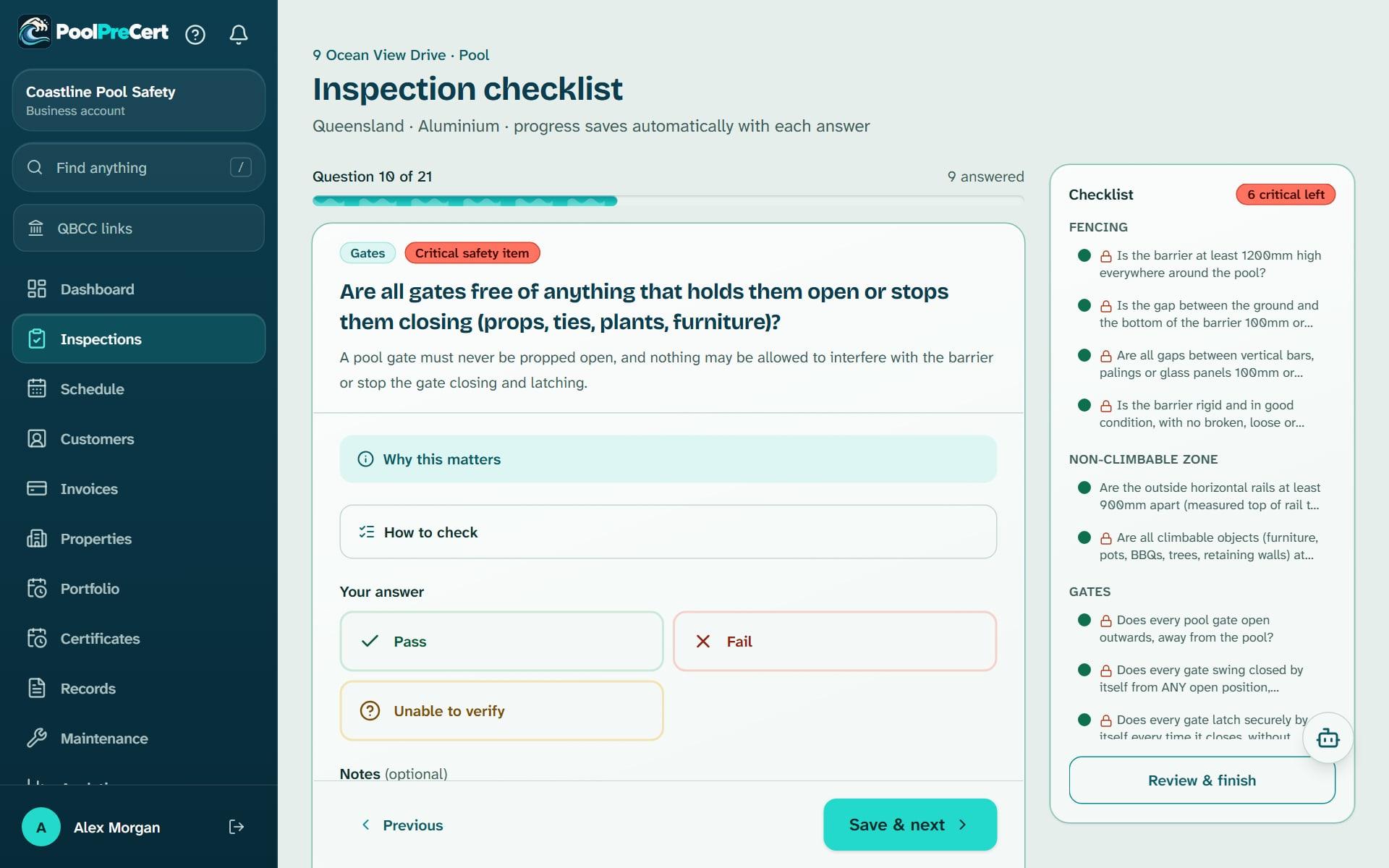
How the PoolPreCert app keeps it
These are the records tools in the app today. The app is a record-keeping aid. It does not lodge anything with QBCC, decide anything or connect to the QBCC Portal.
- A readiness list on each inspection that shows what has been captured and what is missing against the fact sheet: who was present, photos with a time, the two gate videos, non-climbable zone notes, a barrier sketch and the reasons for the decision. It says nothing about the pool or your decision.
- Photo and video times are read from the file on your phone before the app re-encodes it, and shown with where they came from. That time is the camera's own record, not a trusted clock, so the app keeps the server's upload time beside it.
- Gate videos: record in the app (about 720p, up to 59 seconds) or upload a clip you already have. A clip over 60 seconds or 50 MB is not accepted. Gate videos need a connection, and are switched off in the demo.
- A non-climbable zone note for each such item (side, justification and items judged non-climbable), a barrier sketch tool, and a records page for exemptions or variations, performance solutions, reasons for the decision and a dated log of conversations and advice.
- A Form 26 reinspection tracker that follows the three-month date.
- A keep until date five years after completion on each finished professional inspection, and a record pack to download with the photos, videos, report PDFs, a web page and checksums.
While your account is open, a finished inspection and its photos and videos cannot be deleted by a user within that five years. If you close your account they are deleted with it, so download your record packs first. Help has the details: inspection records, Form 26 reminders and retention, the checklist, photos and finishing and photo mode.
How this page was made: the PoolPreCert team read each page listed under Sources on 5 November 2026 and wrote this in plain words. The dates beside each source are the dates those pages show. PoolPreCert is not part of QBCC or the Queensland Government, and only a licensed pool safety inspector decides whether a pool meets the standard.
Keep your records in one place
Find the listing built from QBCC's register for your licence. There is no charge to claim it, and the demo shows the records tools with example data.
The demo is a private copy with made-up example data. No sign-up.
Common questions
How long must an inspector keep inspection records?
QBCC's fact sheet says records must be retained for at least 5 years, and that best practice is to keep them securely stored, regularly backed up and easily retrievable for that time.
Are photos and video required?
The fact sheet says adequate records must include a combination of acceptable evidence: photographs and videos (time and date stamped), contemporaneous notes, reports such as a checklist or job log notes, and diagrams. It lists video of gate operation from all positions and of gate self-closing and self-latching effectiveness.
What does a record have to show?
QBCC says records must be clear, legible and objective, must support the decision to issue a certificate or nonconformity notice, must show how the standard was assessed, and must be enough for a third party to assess whether the pool meets the standard.
Does PoolPreCert send records to QBCC?
No. The Records tools in the app are a record-keeping aid. They do not lodge anything with QBCC, decide anything or connect to the QBCC Portal.
What happens to records if I close my account?
A finished professional inspection shows a keep until date five years on and cannot be deleted by a user while the account is open, but closing the account deletes everything with it, so download your record packs first.